
300-630 · Question #120
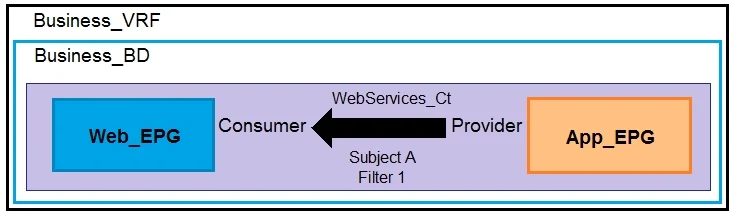
Refer to the exhibit. Which configuration set must be applied to filter 1 to enable SSH communication between Web_EPG to App_EPG?
The correct answer is D. Apply Both Directions: Enabled. To enable SSH communication between Web_EPG (Web Endpoint Group) and App_EPG (Application Endpoint Group), it's necessary to apply a configuration that allows bidirectional communication while not restricting ports based on their directionality. By enabling "Apply Both…
Question
Refer to the exhibit. Which configuration set must be applied to filter 1 to enable SSH communication between Web_EPG to App_EPG?
Exhibit
Options
- AApply Both Directions: Disabled
- BApply Both Directions: Enabled
- CApply Both Directions: Disabled
- DApply Both Directions: Enabled
How the community answered
(33 responses)- A3% (1)
- B6% (2)
- C18% (6)
- D73% (24)
Explanation
To enable SSH communication between Web_EPG (Web Endpoint Group) and App_EPG (Application Endpoint Group), it's necessary to apply a configuration that allows bidirectional communication while not restricting ports based on their directionality. By enabling "Apply Both Directions" and disabling "Reverse Filter Ports," this ensures that the filter allows SSH packets to flow from Web_EPG to App_EPG and vice versa without any restrictions based on the port's direction, which is essential for establishing an SSH session.
Topics
Community Discussion
No community discussion yet for this question.