
300-615 · Question #88
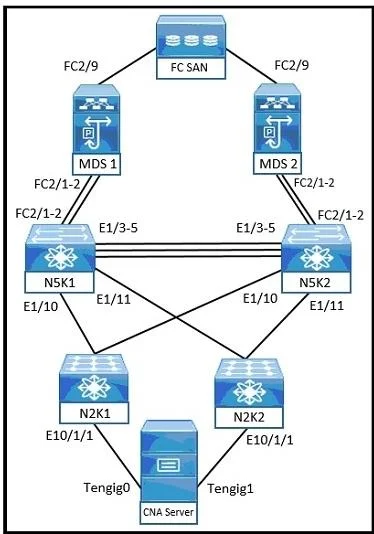
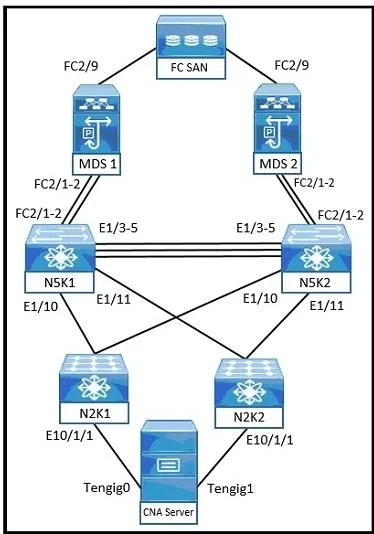
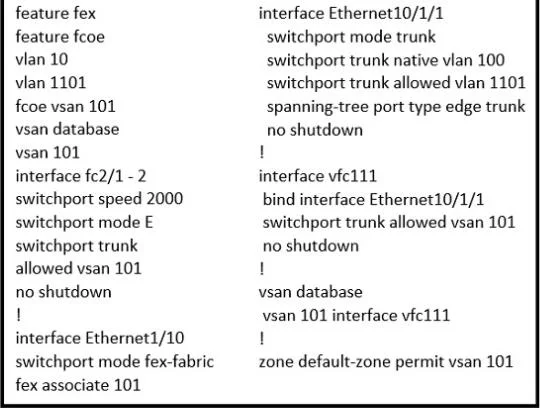
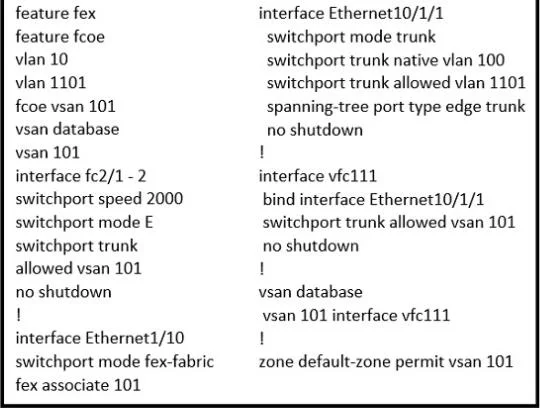
Refer to the exhibits. An engineer troubleshoots switch N5K1, which fails to receive traffic from the file server. Which set of actions resolves this problem?
The correct answer is C. Bind native VLAN 10 with Ethemet10/1/1 and allow VLAN 10 in trunk configuration. Option C is correct because on a Nexus 5000, FCoE requires a Virtual Fibre Channel (VFC) interface to be bound to the correct physical Ethernet interface (Ethernet10/1/1, which connects to the file server) and the corresponding FCoE VLAN (VLAN 10) must be allowed on the trunk…
Question
Refer to the exhibits. An engineer troubleshoots switch N5K1, which fails to receive traffic from the file server. Which set of actions resolves this problem?
Exhibits
Options
- ABind native VLAN 10 with Ethemet1/10 and allow VSAN 101 in trunk configuration.
- BAssign native VLAN 10 with vfc111 and allow VLAN 1101 in trunk configuration.
- CBind native VLAN 10 with Ethemet10/1/1 and allow VLAN 10 in trunk configuration
- DAssign native VLAN 10 with fc2.'l - 2 and allow VLAN 10 in trunk configuration.
How the community answered
(49 responses)- A16% (8)
- B2% (1)
- C76% (37)
- D6% (3)
Explanation
Option C is correct because on a Nexus 5000, FCoE requires a Virtual Fibre Channel (VFC) interface to be bound to the correct physical Ethernet interface (Ethernet10/1/1, which connects to the file server) and the corresponding FCoE VLAN (VLAN 10) must be allowed on the trunk - both misconfigurations together explain why the switch fails to receive traffic.
Option A is wrong for two reasons: it references the wrong interface (Ethernet1/10 instead of Ethernet10/1/1), and it incorrectly tries to "allow VSAN 101" on the trunk - trunk configurations allow VLANs, not VSANs directly.
Option B is wrong because you do not assign a native VLAN to a VFC interface; native VLANs apply to physical Ethernet interfaces, and VLAN 1101 is not the correct FCoE VLAN in this scenario.
Option D is wrong because fc2.1-2 refers to a physical Fibre Channel port notation, which is unrelated to FCoE VFC binding - you cannot bind an FCoE VFC to a native FC interface.
Memory tip: Think "VFC binds to Ethernet, trunk allows VLAN" - in FCoE troubleshooting, always verify (1) the VFC is bound to the exact physical Ethernet port facing the host, and (2) the FCoE VLAN is explicitly permitted on the trunk. If either piece is wrong or mismatched, FCoE traffic silently fails.
Community Discussion
No community discussion yet for this question.