
300-615 · Question #275
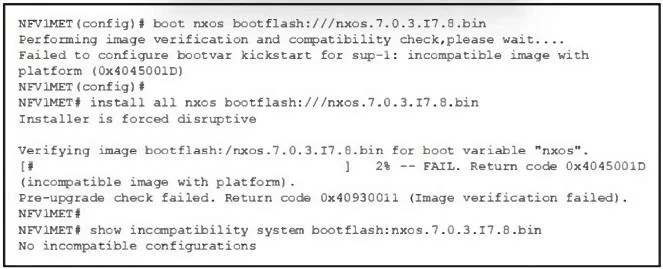
Refer to the exhibit. A network engineer failed to upgrade the Cisco Nexus switch. Which action must be taken before the upgrade to resolve the issue?
The correct answer is A. Upgrade to the intermediate software image. The error message shows that the image verification failed due to an incompatible image with the platform. This typically happens when there is a need to upgrade through an intermediate software version before moving to the desired version. Some platforms require stepping…
Question
Refer to the exhibit. A network engineer failed to upgrade the Cisco Nexus switch. Which action must be taken before the upgrade to resolve the issue?
Exhibits
Options
- AUpgrade to the intermediate software image
- BActivate the supervisor module using the TFTP protocol
- CDelete the current NX-OS kickstart software
- DCopy the EPLD file onto the standby SUP bootflash
How the community answered
(48 responses)- A77% (37)
- B6% (3)
- C13% (6)
- D4% (2)
Explanation
The error message shows that the image verification failed due to an incompatible image with the platform. This typically happens when there is a need to upgrade through an intermediate software version before moving to the desired version. Some platforms require stepping through specific NX-OS versions, especially if there are significant changes in the system architecture or To resolve the issue, you should first upgrade to the intermediate software image that is compatible with the current platform and then proceed with the final upgrade.
Topics
Community Discussion
No community discussion yet for this question.