
300-615 · Question #139
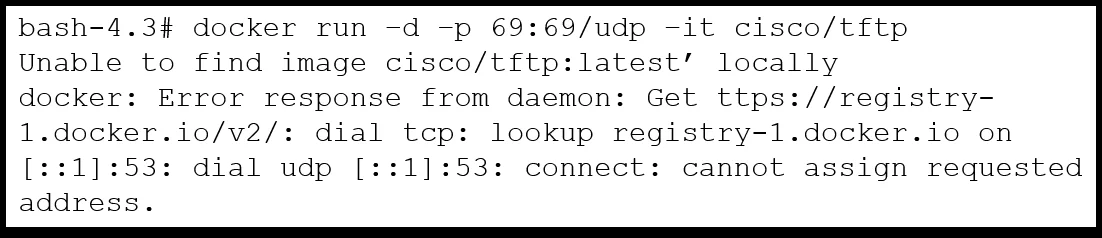
Refer to the exhibit. An engineer is experiencing a problem when running a Docker container inside the Cisco Nexus 9000 bash shell. Which action resolves the issue?
The correct answer is A. Add a new nameserver. Option A is correct because the exhibit likely shows a DNS resolution failure when the Docker container attempts to pull an image or reach an external host. Inside the Nexus 9000 bash shell, Docker containers inherit the host's /etc/resolv.conf; if no valid nameserver is…
Question
Refer to the exhibit. An engineer is experiencing a problem when running a Docker container inside the Cisco Nexus 9000 bash shell. Which action resolves the issue?
Exhibits
Options
- AAdd a new nameserver
- BConnect to bash as a different user
- CChange VRF to management
- DConfigure the mgmt0 interface
How the community answered
(31 responses)- A74% (23)
- B6% (2)
- C3% (1)
- D16% (5)
Explanation
Option A is correct because the exhibit likely shows a DNS resolution failure when the Docker container attempts to pull an image or reach an external host. Inside the Nexus 9000 bash shell, Docker containers inherit the host's /etc/resolv.conf; if no valid nameserver is configured there, the container cannot resolve hostnames and the operation fails - adding a nameserver (e.g., 8.8.8.8) fixes this immediately.
Why the distractors are wrong:
- B (different user): DNS resolution is system-wide and not tied to which user launches the container; switching users leaves the missing nameserver problem intact.
- C (change VRF to management): While the management VRF provides outbound connectivity on a Nexus switch, VRF context alone doesn't supply a nameserver - you still need a valid DNS entry to resolve names.
- D (configure mgmt0): The management interface must already be reachable for Docker to attempt a connection at all; the failure point here is name resolution, not L3 reachability.
Memory tip: Think "Docker needs DNS first." On Nexus 9000, any connectivity error inside a container that mentions "name resolution" or "unable to resolve host" points straight to a missing nameserver in /etc/resolv.conf - add one before investigating anything else.
Community Discussion
No community discussion yet for this question.