
Cisco
300-535 · Question #82
Refer to the exhibit. What must be added at lines 6 and 15 to check the IP addresses of the interfaces and configure the logging history of a Cisco IOS XR device?
Sign in or unlock 300-535 to reveal the answer and full explanation for question #82. The question stem and answer options stay visible for context.
Design for Cisco Cloud Automation
Question
Refer to the exhibit. What must be added at lines 6 and 15 to check the IP addresses of the interfaces and configure the logging history of a Cisco IOS XR device?
Exhibit
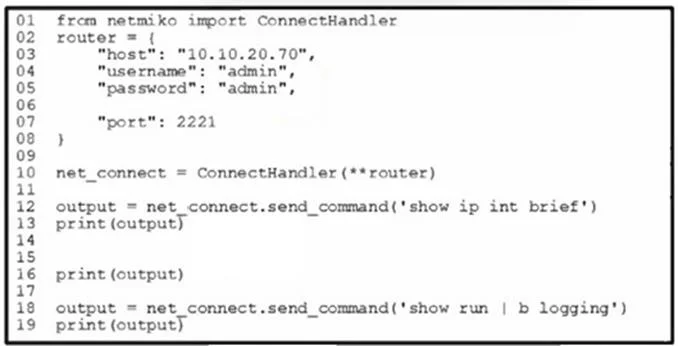
Options
- AAl line 6, add "device_type": "iosxr"
- BAt line 6, add "device_type": "cisco_xr"
- CAt line 6, add "device type": "cisco xr"
- DAt line 6, add "device_type": "ios_xr"
Unlock 300-535 to see the answer
You've previewed enough free 300-535 questions. Unlock 300-535 for full answers, explanations, the timed quiz mode, progress tracking, and the master PDF. Question stem and options stay visible so you can still see what's on the exam.
Topics
#Netmiko#IOS XR#Python#device_type parameter