
300-430 · Question #12
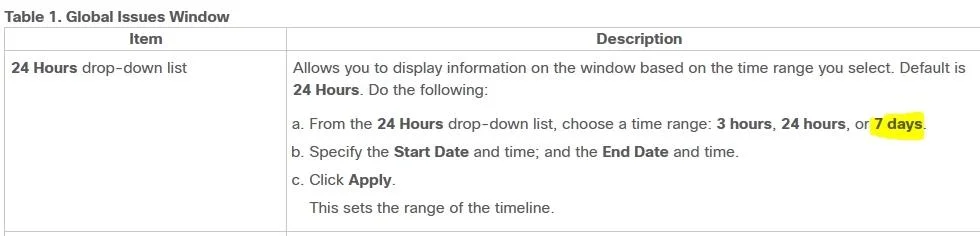
What is the maximum time range that can be viewed on the Cisco DNA Center issues and alarms page?
The correct answer is D. 7 days. Cisco DNA Center's issues and alarms dashboard supports a maximum lookback window of 7 days for reviewing historical network events.
Question
What is the maximum time range that can be viewed on the Cisco DNA Center issues and alarms page?
Exhibit
Options
- A3 hours
- B24 hours
- C3 days
- D7 days
How the community answered
(42 responses)- A5% (2)
- B2% (1)
- C2% (1)
- D90% (38)
Why each option
Cisco DNA Center's issues and alarms dashboard supports a maximum lookback window of 7 days for reviewing historical network events.
3 hours is a valid short-range filter option available on the DNA Center dashboard but is not the maximum time range supported for issues and alarms.
24 hours is a supported view interval in DNA Center's assurance interface but falls well short of the 7-day maximum available for issues and alarms history.
3 days is a valid intermediate filter option in DNA Center but is not the maximum - the platform supports viewing up to 7 days of issues and alarms data.
The Cisco DNA Center issues and alarms page provides selectable time range filters, and 7 days is the maximum supported window - allowing network operators to review and correlate up to one week of historical issue and alarm data from the assurance dashboard.
Concept tested: Cisco DNA Center assurance issues and alarms time range
Source: https://www.cisco.com/c/en/us/td/docs/cloud-systems-management/network-automation-and-management/dna-center/2-3-7/user_guide/b_cisco_dna_center_ug_2_3_7/b_cisco_dna_center_ug_2_3_7_chapter_01011.html
Topics
Community Discussion
No community discussion yet for this question.