
300-430 · Question #114
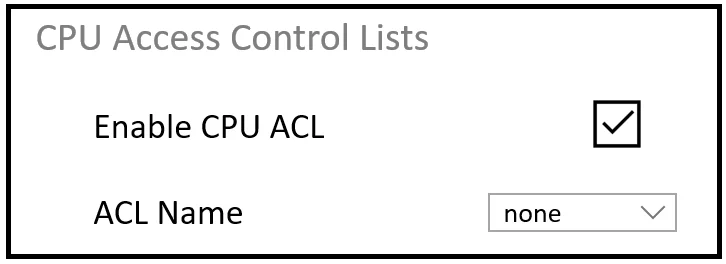
Refer to the exhibit. An engineer must restrict some subnets to have access to the WLC. When the CPU ACL function is enabled. No ACLs in the drop-down list are seen. What is the cause of the problem?
The correct answer is B. No ACLs have been created under the Access Control List tab. The CPU ACL drop-down is empty because no ACLs have been created yet in the WLC's Access Control Lists section - the ACL must be created there before it can be assigned as a CPU ACL.
Question
Refer to the exhibit. An engineer must restrict some subnets to have access to the WLC. When the CPU ACL function is enabled. No ACLs in the drop-down list are seen. What is the cause of the problem?
Exhibit
Options
- AThe ACL does not have a rule that is specified to the Management interface.
- BNo ACLs have been created under the Access Control List tab.
- CWhen the ACL is created, it must be specified that it is a CPU ACL.
- DThis configuration must be performed through the CLI and not though the web GUI
How the community answered
(40 responses)- A3% (1)
- B75% (30)
- C8% (3)
- D15% (6)
Why each option
The CPU ACL drop-down is empty because no ACLs have been created yet in the WLC's Access Control Lists section - the ACL must be created there before it can be assigned as a CPU ACL.
CPU ACLs apply globally to all traffic destined to the WLC's CPU regardless of which interface it arrives on - there is no requirement to add a Management-interface-specific rule for an ACL to appear in the drop-down.
The WLC's CPU ACL selection drop-down is dynamically populated only from ACLs already defined under Security > Access Control Lists; if that list is empty, the drop-down has nothing to display, and the engineer must first create at least one ACL in that section before the CPU ACL feature can be applied.
No special flag or type designation is needed when creating an ACL for CPU ACL use; any standard ACL created under the Access Control Lists tab automatically becomes selectable in the CPU ACL drop-down.
Cisco WLC fully supports CPU ACL configuration through the web-based GUI under the Security tab, so CLI-only access is not required and is not the cause of the empty drop-down.
Concept tested: Cisco WLC CPU ACL prerequisite - ACL must exist before assignment
Source: https://www.cisco.com/c/en/us/support/docs/wireless/4400-series-wireless-lan-controllers/107606-cpu-acl-wlc.html
Topics
Community Discussion
No community discussion yet for this question.