
300-415 · Question #374
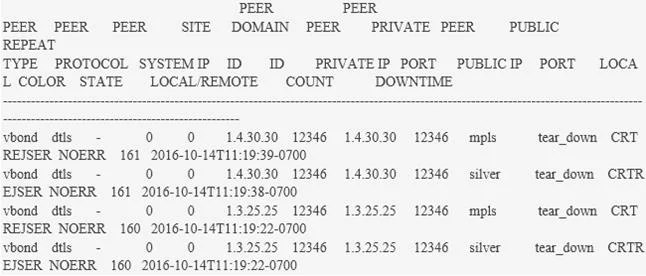
Refer to the exhibit. An engineer must use the existing configurations of the Spoke1 site and build a new one for the Spoke2 site Which configuration establishes the SD-WAN underlay connectivity?
The correct answer is D. system system-ip 10.0.0.102 site-id 10 admin-tech-on-failure organization-name abc vbond 100.0.0.9 ! ip route 0.0.0.0 0.0.0.0 100.0.0.6 ! interface GigabitEthernet1 description MPLS Network *** no shutdown ip address 100.0.0.5 255.255.255.252 ! interface Tunnel1 no shutdown ip unnumbered GigabitEthernet1 tunnel source GigabitEthernet1 tunnel mode sdwan ! sdwan interface GigabitEthernet1 tunnel-interface encapsulation ipsec color mpls no allow-service all. SD-WAN underlay connectivity for a WAN Edge device requires basic system parameters, interface configuration, a default route, and specifically, the sdwan interface configuration with tunnel-interface and color to establish control and data plane tunnels.
Question
Exhibit
Options
- Asystem system-ip 10.0.0.102 site-id 10 admin-tech-on-failure organization-name abc vbond 100.0.0.9 ! ip route 0.0.0.0 0.0.0.0 100.0.0.6 ! interface GigabitEthernet1 description MPLS Network *** no shutdown ip address 100.0.0.5 255.255.255.252
- Bhostname cEdge2 ! interface GigabitEthernet1 description MPLS Network *** ip address 100.0.0.5 255.255.255.252 ! interface GigabitEthernet3 description Out Of Band Network *** ip address 100.0.0.3 255.255.255.0 ! ip route 0.0.0.0 0.0.0.0 100.0.0.6
- Chostname cEdge2 ! interface GigabitEthernet1 description MPLS Network *** ip address 100.0.0.5 255.255.255.252 ! interface GigabitEthernet3 description Out Of Band Network *** ip address 100.0.0.3 255.255.255.0 ! ip route 0.0.0.0 0.0.0.0 100.0.0.6
- Dsystem system-ip 10.0.0.102 site-id 10 admin-tech-on-failure organization-name abc vbond 100.0.0.9 ! ip route 0.0.0.0 0.0.0.0 100.0.0.6 ! interface GigabitEthernet1 description MPLS Network *** no shutdown ip address 100.0.0.5 255.255.255.252 ! interface Tunnel1 no shutdown ip unnumbered GigabitEthernet1 tunnel source GigabitEthernet1 tunnel mode sdwan ! sdwan interface GigabitEthernet1 tunnel-interface encapsulation ipsec color mpls no allow-service all
How the community answered
(32 responses)- A3% (1)
- B16% (5)
- C9% (3)
- D72% (23)
Why each option
SD-WAN underlay connectivity for a WAN Edge device requires basic system parameters, interface configuration, a default route, and specifically, the `sdwan` interface configuration with `tunnel-interface` and `color` to establish control and data plane tunnels.
This configuration is missing the `sdwan` specific interface configuration (`tunnel-interface` and `color`) and the `tunnel mode sdwan` which are essential for forming the SD-WAN overlay tunnels.
This configuration lacks the `system` block with SD-WAN specific parameters (system-ip, site-id, vbond) and the `sdwan` interface configuration, which are foundational for an SD-WAN device.
This configuration is missing the `system` block and the `sdwan` interface configuration necessary for an SD-WAN WAN Edge device, similar to option B.
This configuration snippet correctly establishes the SD-WAN underlay. It includes essential system parameters, configures a physical interface with an IP address, adds a default route for reachability, and crucially defines a `tunnel` interface in `sdwan` mode and marks the physical interface as a `tunnel-interface` with a `color`, which is necessary for forming IPsec tunnels and establishing control connections to the vSmart and vBond controllers.
Concept tested: SD-WAN WAN Edge underlay configuration
Source: https://www.cisco.com/c/en/us/td/docs/routers/sdwan/configuration/sdwan-xe-gs-book/m-sdwan-basic-configuration.html
Topics
Community Discussion
No community discussion yet for this question.