
2V0-622D · Question #152
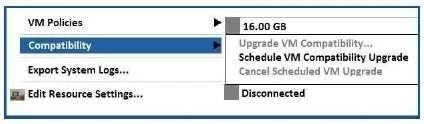
After upgrading the vSphere infrastructure and VMware Tools to version 6.5, the "Upgrade VM Compatibility" option is grayed out in the vSphere Web Client. (See Exhibit.) What must the administrator…
The correct answer is D. Power off the virtual machine. The 'Upgrade VM Compatibility' option is grayed out because upgrading virtual hardware compatibility requires the virtual machine to be in a powered-off state.
Question
After upgrading the vSphere infrastructure and VMware Tools to version 6.5, the "Upgrade VM Compatibility" option is grayed out in the vSphere Web Client. (See Exhibit.) What must the administrator do to enable the VM compatibility upgrade?
Exhibit
Options
- AVMware Tools should be upgraded last.
- BRestart the ESXi server.
- CUninstall VMware Tools.
- DPower off the virtual machine.
How the community answered
(30 responses)- B3% (1)
- C3% (1)
- D93% (28)
Why each option
The 'Upgrade VM Compatibility' option is grayed out because upgrading virtual hardware compatibility requires the virtual machine to be in a powered-off state.
The order in which VMware Tools is upgraded does not affect whether the VM compatibility upgrade option is available; the grayed-out state is determined solely by the VM's power state.
Restarting the ESXi host does not enable the upgrade option for a specific VM; the option requires the individual VM to be powered off, not the host to be rebooted.
Uninstalling VMware Tools has no bearing on enabling VM hardware compatibility upgrades, as the two features are independent, and removing Tools would be counterproductive.
VM hardware compatibility upgrades modify the virtual machine's configuration file to reference a newer virtual hardware version, which requires exclusive access only possible when the VM is powered off. Powering off the VM releases it from the running state and allows vSphere to safely apply the hardware version change.
Concept tested: Virtual machine hardware compatibility upgrade prerequisites
Source: https://docs.vmware.com/en/VMware-vSphere/6.5/com.vmware.vsphere.vm_admin.doc/GUID-60768C2F-72E1-42E0-8A17-CA76849F2950.html
Topics
Community Discussion
No community discussion yet for this question.