
Broadcom-VMware
2V0-622 · Question #324
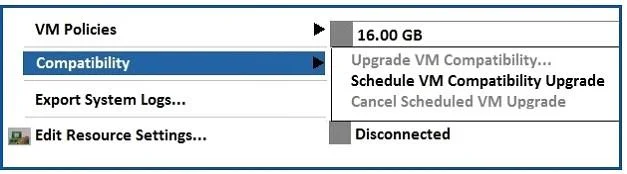
After upgrading the vSphere infrastructure and VMware Tools to version 6.5, the "Upgrade VM Compatibility" option is grayed out in the vSphere Web Client. (See Exhibit.) What must the administrator…
The correct answer is D. Power off the virtual machine. https://docs.vmware.com/en/VMware-vSphere/6.5/com.vmware.vsphere.vm_admin.doc/GUID- 41AA8386-D1DA-4788-9718-216C62CE112A.html
Section 8 – Deploy and Administer VMware Virtual Machines
Question
After upgrading the vSphere infrastructure and VMware Tools to version 6.5, the "Upgrade VM Compatibility" option is grayed out in the vSphere Web Client. (See Exhibit.) What must the administrator do to enable the VM compatibility upgrade?
Exhibit
Options
- AVMware Tools should be upgraded last.
- BRestart the ESXi server.
- CUninstall VMware Tools.
- DPower off the virtual machine.
How the community answered
(40 responses)- A5% (2)
- B10% (4)
- C3% (1)
- D83% (33)
Explanation
https://docs.vmware.com/en/VMware-vSphere/6.5/com.vmware.vsphere.vm_admin.doc/GUID- 41AA8386-D1DA-4788-9718-216C62CE112A.html
Topics
#VM hardware compatibility#VM compatibility upgrade#VMware Tools#power state
Community Discussion
No community discussion yet for this question.