
2V0-622 · Question #215
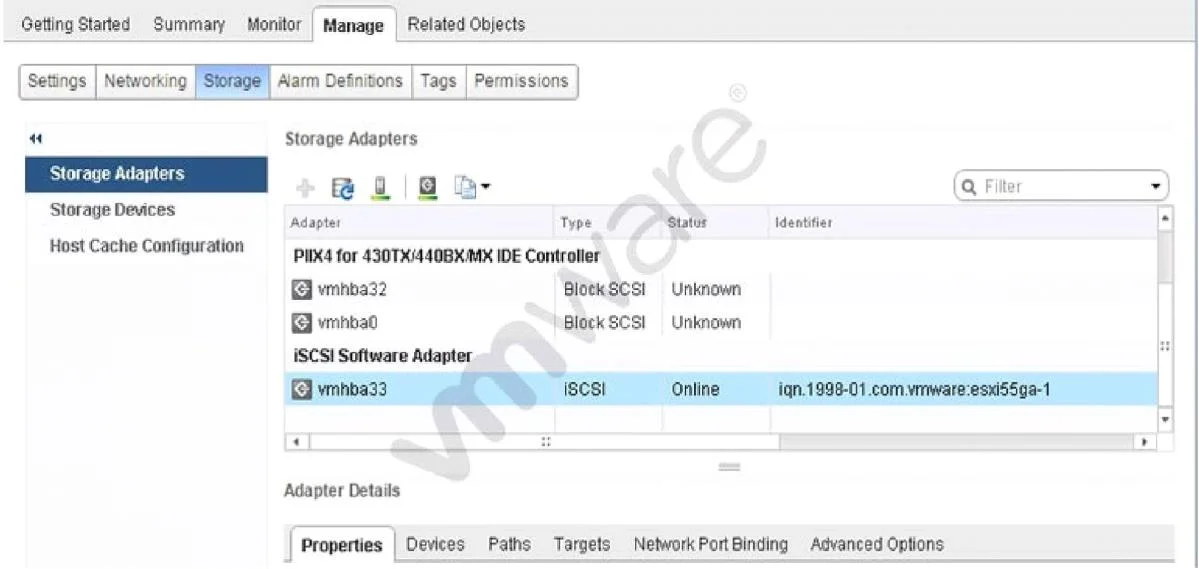
Refer to the Exhibit. An administrator would like to add Challenge Handshake Authentication Protocol (CHAP) to an iSCSI adapter. The administrator accesses the Storage Adapters menu as shown in the…
The correct answer is A. Properties. CHAP authentication settings for an iSCSI software adapter in vSphere are found and configured in the Properties tab of the Storage Adapters view.
Question
Refer to the Exhibit. An administrator would like to add Challenge Handshake Authentication Protocol (CHAP) to an iSCSI adapter. The administrator accesses the Storage Adapters menu as shown in the Exhibit. In which tab can the task be accomplished?
Exhibit
Options
- AProperties
- BAdvanced Options
- CTargets
- DDevices
How the community answered
(38 responses)- A92% (35)
- B3% (1)
- D5% (2)
Why each option
CHAP authentication settings for an iSCSI software adapter in vSphere are found and configured in the Properties tab of the Storage Adapters view.
The Properties tab of the iSCSI software adapter in the vSphere Client contains the CHAP authentication section, where administrators configure the CHAP name, secret, and direction (one-way or mutual). This is the designated location within the Storage Adapters menu to enable and configure CHAP on an iSCSI initiator.
The Advanced Options tab contains iSCSI adapter parameters such as login timeout and digest settings, not CHAP credential configuration.
The Targets tab is used to configure static or dynamic discovery targets for iSCSI, not to set authentication methods.
The Devices tab lists storage devices (LUNs) visible to the adapter and provides no authentication configuration options.
Concept tested: iSCSI CHAP authentication configuration in vSphere
Source: https://docs.vmware.com/en/VMware-vSphere/8.0/vsphere-storage/GUID-E3BC05B4-DBBB-4F56-A35A-26BE7BD76B8D.html
Topics
Community Discussion
No community discussion yet for this question.