
2V0-622 · Question #107
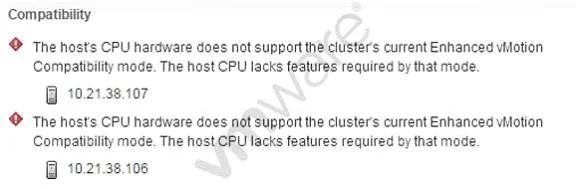
Refer to the Exhibit. An administrator is attempting to enable Enhanced vMotion Compatibility (EVC), but receives the error shown in the Exhibit. Which condition would explain the error?
The correct answer is C. The ESXi host CPU has the Intel No-Execute feature disabled. EVC requires that certain CPU security features, including the Intel No-Execute (NX/XD) bit, be enabled in the host BIOS before the feature can be activated on a cluster.
Question
Refer to the Exhibit. An administrator is attempting to enable Enhanced vMotion Compatibility (EVC), but receives the error shown in the Exhibit. Which condition would explain the error?
Exhibit
Options
- AThe ESXi hosts are not licensed for EVC.
- BThe administrator does not have privileges to enable EVC.
- CThe ESXi host CPU has the Intel No-Execute feature disabled.
- DThe administrator has turned on Intel Virtualization Technology.
How the community answered
(60 responses)- A5% (3)
- B13% (8)
- C78% (47)
- D3% (2)
Why each option
EVC requires that certain CPU security features, including the Intel No-Execute (NX/XD) bit, be enabled in the host BIOS before the feature can be activated on a cluster.
EVC is a vSphere feature included with standard vCenter licensing and does not require a separate per-host license to enable.
A privilege error would produce a different message indicating insufficient permissions, not the CPU feature incompatibility error shown in the exhibit.
Enhanced vMotion Compatibility performs a baseline CPU feature check before enabling; the Intel No-Execute (NX/XD) feature must be enabled in the host BIOS/UEFI firmware. If NX is disabled, vCenter reports an error because EVC cannot mask or guarantee this feature across hosts, blocking activation until the BIOS setting is corrected.
Intel Virtualization Technology (VT-x) being turned on is a prerequisite for running VMs generally, not a cause of an EVC error; its absence, not presence, would cause issues unrelated to EVC.
Concept tested: EVC enablement CPU BIOS prerequisite - NX/XD bit
Source: https://docs.vmware.com/en/VMware-vSphere/7.0/com.vmware.vsphere.vcenterhost.doc/GUID-2A1EE4C3-0E3A-46AF-A420-FFFB02BD3CFF.html
Topics
Community Discussion
No community discussion yet for this question.