
2V0-622 · Question #105
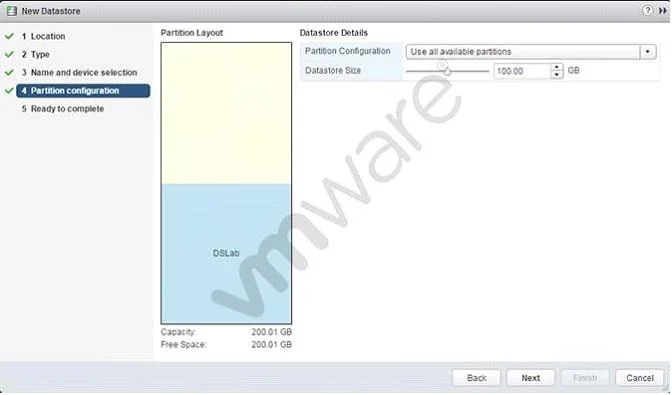
Refer to the Exhibit. What will be created upon completion of the steps in this wizard?
The correct answer is A. 100GB VMFS5 datastore with free space available for expansion. The VMFS datastore wizard allows partitioning only a portion of available disk capacity, leaving the remainder free for future expansion or additional datastores on the same LUN.
Question
Refer to the Exhibit. What will be created upon completion of the steps in this wizard?
Exhibit
Options
- A100GB VMFS5 datastore with free space available for expansion
- B100GB VMFS5 datastore with free space available for a second datastore
- C100GB VMFS3 datastore
- D200.01 GB VMFS5 datastore
How the community answered
(29 responses)- A79% (23)
- B7% (2)
- C10% (3)
- D3% (1)
Why each option
The VMFS datastore wizard allows partitioning only a portion of available disk capacity, leaving the remainder free for future expansion or additional datastores on the same LUN.
When creating a VMFS5 datastore, the wizard allows the administrator to specify a custom size smaller than the total available capacity - in this case 100GB out of a larger disk. The remaining unpartitioned space is available to expand this datastore later using the 'Expand Datastore' option, which is a key VMFS5 capability.
Remaining free space on the same LUN cannot be used to create a second independent datastore without first partitioning it separately; VMFS extents extend an existing datastore, they do not create a new one.
The wizard shown creates VMFS5, not the older VMFS3 format; VMFS3 is a legacy version that would not be offered by default in modern vSphere environments.
The datastore size is set to 100GB as specified in the wizard, not 200.01GB; the larger figure would only apply if the entire disk were consumed.
Concept tested: VMFS5 datastore creation and capacity partitioning
Source: https://docs.vmware.com/en/VMware-vSphere/7.0/com.vmware.vsphere.storage.doc/GUID-5EE84941-366D-4D37-8B7B-767D08928888.html
Topics
Community Discussion
No community discussion yet for this question.