
2V0-621D · Question #214
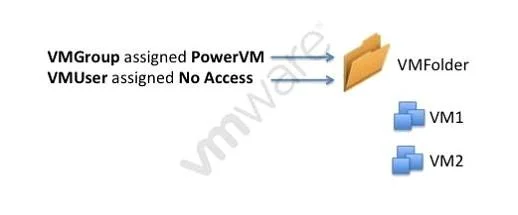
Review the Exhibit. An administrator has configured permissions for a group called VMGroup and a user named VMUser. A new Role has been created called PowerVM. The group and role have these…
The correct answer is A. The VMUser permission overrides the VMGroup permission. Give No Access to the user at the vCenter Level. Go to the particular cluster you want to give permissions for. Then click on the permissions tab of that cluster and give the user Administrator access(or whatever role you intend to give). It will ask to override the inherited…
Question
Review the Exhibit. An administrator has configured permissions for a group called VMGroup and a user named VMUser. A new Role has been created called PowerVM. The group and role have these charecteristics:
- PowerVM role can power on VMs
- VMGroup granted PowerVM role on VMFolder
- VMUser is a member of VMGroup
- VMUser granted No Access on VMFolder
Based on the exhibit, which statement best explains why VMUser is denied access to the VMFolder?
Exhibit
Options
- AThe VMUser permission overrides the VMGroup permission.
- BThe No Access role overrides the PowerVM role.
- CThe VMGroup permission overrides the VMUser permission.
- DThe PowerVM role overrides the No Access role.
How the community answered
(31 responses)- A84% (26)
- B10% (3)
- C3% (1)
- D3% (1)
Explanation
Give No Access to the user at the vCenter Level. Go to the particular cluster you want to give permissions for. Then click on the permissions tab of that cluster and give the user Administrator access(or whatever role you intend to give). It will ask to override the inherited permissions, say Yes. Now when the user logs in, he/she will see only one cluster under the vCenter. No access will remove the visibility to the object
Topics
Community Discussion
No community discussion yet for this question.