
2V0-621D · Question #212
An administrator has recently configured HA on a cluster. After reviewing the summary tab on one of the hosts, the warning in Exhibit 1 is displayed: The administrator proceeds to view the…
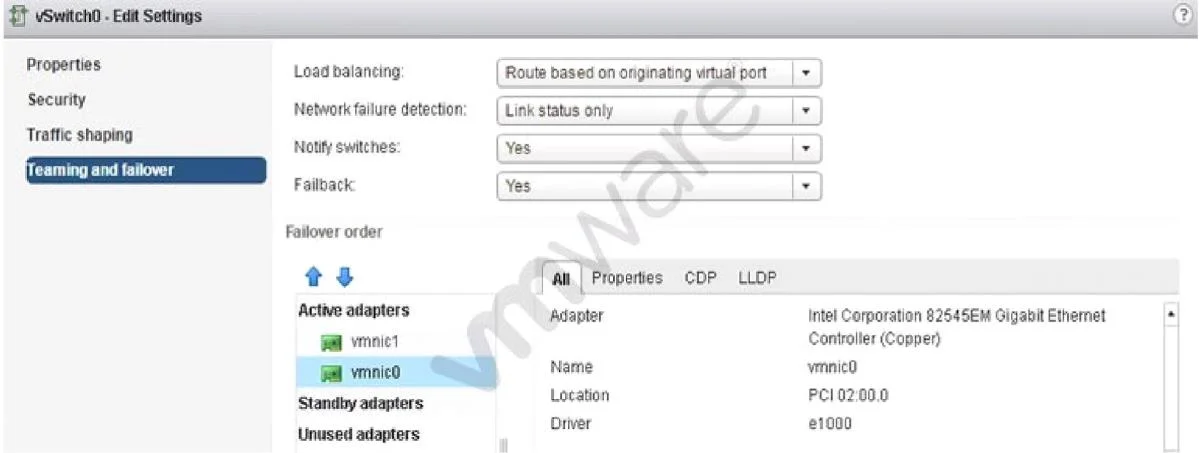
The correct answer is A. Move vmnic1 to Standby adapters. D. Uncheck the Override Failover Checkbox on the management network port group. Enabling redundancy is important for fault tolerance. Move vmnic1 to standby adapters and uncheck the override failover checkbox on the management network port group.
Question
An administrator has recently configured HA on a cluster. After reviewing the summary tab on one of the hosts, the warning in Exhibit 1 is displayed:
The administrator proceeds to view the management network port group data shown in Exhibit 2:
The administrator then views the management network vSwitch as shown in Exhibit 3:
Based on the exhibits, which two steps should be taken to ensure redundancy on the management network? (Choose two.)
Exhibit
Options
- AMove vmnic1 to Standby adapters.
- BAdd an additional vmknic to the Network Adapters and move it to Active adapters.
- CSet the advanced HA configuration parameter das.ignoreRedundantNetWarning to True.
- DUncheck the Override Failover Checkbox on the management network port group.
How the community answered
(27 responses)- A67% (18)
- B22% (6)
- C11% (3)
Explanation
Enabling redundancy is important for fault tolerance. Move vmnic1 to standby adapters and uncheck the override failover checkbox on the management network port group.
Topics
Community Discussion
No community discussion yet for this question.