
Broadcom-VMware
2V0-621D · Question #207
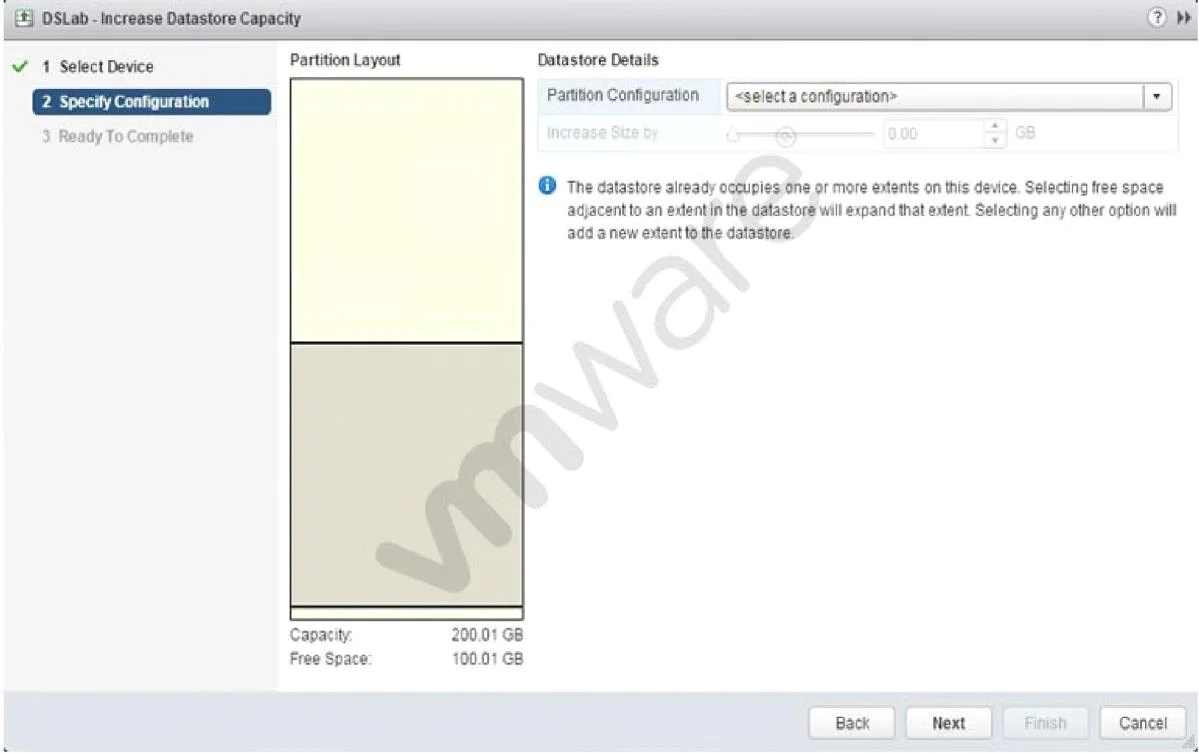
Refer to the Exhibit. An administrator wants to increase the capacity of a VMFS5 datastore; but the Increase Size by s lider is not available, as shown in the Exhibit. How should the administrator…
The correct answer is A. Select a valid partition configuration from the drop-down menu. To increase the capacity of VMFS5 datastore, you can select the drop down menu on the right panel and select a partition configuration that can help increase the capacity.
Section 3 – Configure and Administer vSphere 6.x Storage
Question
Refer to the Exhibit. An administrator wants to increase the capacity of a VMFS5 datastore; but the Increase Size by s lider is not available, as shown in the Exhibit. How should the administrator resolve this problem?
Exhibit
Options
- ASelect a valid partition configuration from the drop-down menu.
- BUse fdisk utility to manually resize the partition.
- CUse the mouse to resize the partition indicated in the Partition Layout.
- DClicking Next will prompt for available usable space.
How the community answered
(59 responses)- A83% (49)
- B10% (6)
- C2% (1)
- D5% (3)
Explanation
To increase the capacity of VMFS5 datastore, you can select the drop down menu on the right panel and select a partition configuration that can help increase the capacity.
Topics
#VMFS datastore#datastore resizing#storage management#partition configuration
Community Discussion
No community discussion yet for this question.