
2V0-620 · Question #28
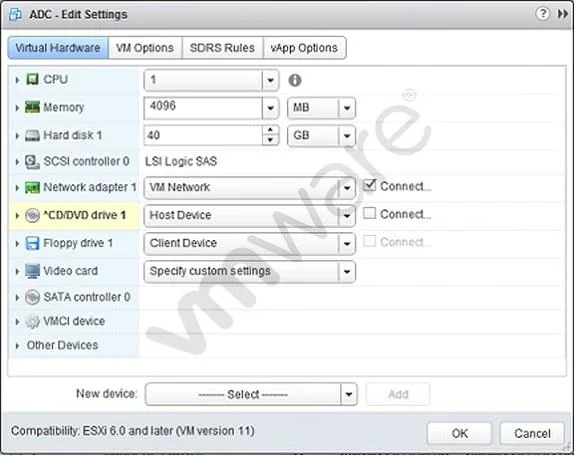
Refer to the Exhibit. An administrator is installing Windows into a virtual machine. The DVD has been mounted on the Host and configured for the virtual machine as shown in the Exhibit. Based on the…
The correct answer is A. The CD/DVD device is not connected. When a CD/DVD device is configured in the VM settings but its 'Connected' state is not enabled at power-on, the VM finds no bootable media and falls back to PXE network boot.
Question
Refer to the Exhibit. An administrator is installing Windows into a virtual machine. The DVD has been mounted on the Host and configured for the virtual machine as shown in the Exhibit. Based on the exhibit, when the virtual machine is booted, why would it attempt to search for a PXE server?
Exhibit
Options
- AThe CD/DVD device is not connected.
- BThe ISO is in the incorrect storage location.
- CThe OS minimum requirements have not been met.
- DThe CD/DVD device is not set to Client Device.
How the community answered
(50 responses)- A92% (46)
- B2% (1)
- C2% (1)
- D4% (2)
Why each option
When a CD/DVD device is configured in the VM settings but its 'Connected' state is not enabled at power-on, the VM finds no bootable media and falls back to PXE network boot.
If the CD/DVD device is present in the VM hardware configuration but the 'Connected' checkbox is not checked when the VM powers on, the virtual BIOS or UEFI firmware does not see any bootable disc. With no local boot source available, the firmware proceeds to the next entry in the boot order, which is typically PXE, causing the VM to broadcast for a network boot server.
An incorrect ISO storage path would prevent the image from being mounted at all, but the PXE fallback behavior is specifically triggered by the device not being in a connected state, not by a missing or mislocated file.
OS minimum hardware requirements relate to whether the OS installer will proceed after boot, not to which boot device the firmware selects, so unmet requirements would not cause a PXE search.
The 'Client Device' option maps a physical drive on the administrator's client machine to the VM, which is a different configuration mode; the exhibit shows a datastore ISO configuration, and the root cause is the connected state of the device, not the device type selection.
Concept tested: VM CD/DVD connected state and PXE boot fallback
Source: https://docs.vmware.com/en/VMware-vSphere/6.0/com.vmware.vsphere.vm_admin.doc/GUID-1E39F3ED-9A95-4B39-8A0E-DA0A6B37B53D.html
Topics
Community Discussion
No community discussion yet for this question.