
2V0-51.21 · Question #6
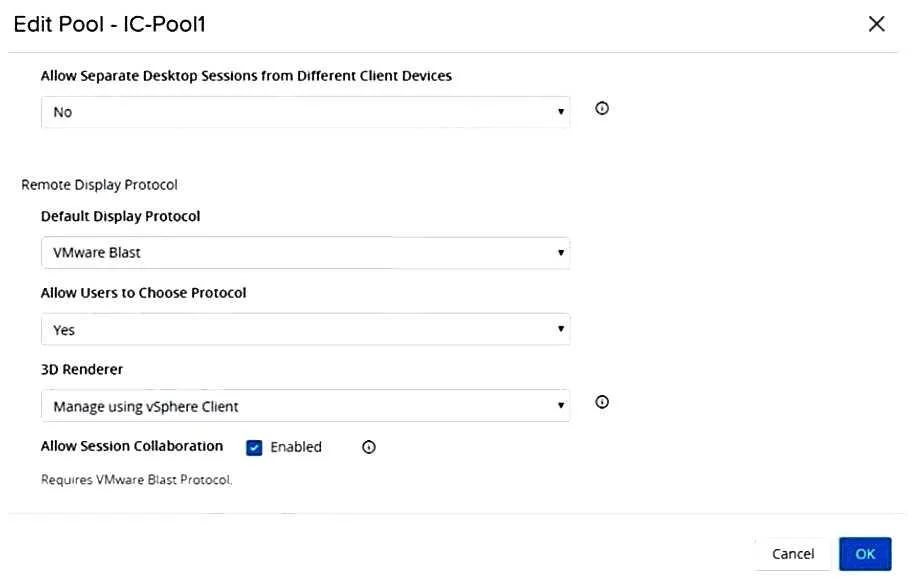
Refer to the exhibit. When editing an existing instant-clone pool, an administrator cannot find the option to configure the vRAM size in the wizard. Referencing the exhibit, which could be the cause…
The correct answer is C. Modifying the vRAM settings is not permitted when selecting Manage using vSphere Client. https://docs.vmware.com/en/VMware-Horizon-7/7.13/horizon-virtual-desktops/GUID-F241F84A- A524-4CA2-B615-50360B3851B1.html When you select the Manage using vSphere Client option, the Configure VRAM for 3D Guests, Max number of monitors, and Max resolution of any one monitor…
Question
Refer to the exhibit. When editing an existing instant-clone pool, an administrator cannot find the option to configure the vRAM size in the wizard. Referencing the exhibit, which could be the cause of the issue?
Exhibit
Options
- AIncreasing vRAM size is only possible for manual pools.
- BModifying the vRAM settings is not permitted when selecting VMware Blast as default protocol.
- CModifying the vRAM settings is not permitted when selecting Manage using vSphere Client.
- DConfiguring vRAM size is only permitted during pool creation.
How the community answered
(27 responses)- A15% (4)
- B7% (2)
- C74% (20)
- D4% (1)
Explanation
https://docs.vmware.com/en/VMware-Horizon-7/7.13/horizon-virtual-desktops/GUID-F241F84A- A524-4CA2-B615-50360B3851B1.html When you select the Manage using vSphere Client option, the Configure VRAM for 3D Guests, Max number of monitors, and Max resolution of any one monitor settings are inactive in Horizon Administrator. You can configure the amount of memory in vSphere Web Client.
Topics
Community Discussion
No community discussion yet for this question.