2V0-41.24 · Question #124
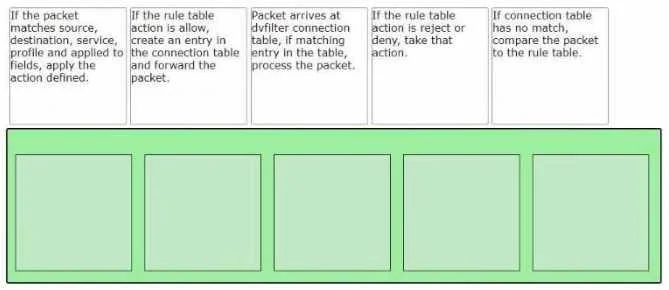
Drag and Drop Question Sort the rule processing steps of the Distributed Firewall. Order responses from left to right. Answer:
The correct answer is Packet arrives at vFilter connection table. If matching entry in the table, process the packet.; If connection table has no match, compare the packet to the rule table.; If the packet matches source, destination, service, profile and applied to fields, apply the action defined.; If the rule table action is allow, create an entry in the connection table and forward the packet.; If the rule table action is reject or deny, take that action. VMware NSX Distributed Firewall (DFW) - Rule Processing Order Explained The DFW is a stateful firewall embedded in the hypervisor kernel (vFilter). Its processing follows a two-phase logic: check existing state first, then evaluate rules only if necessary. This is critical for…
Question
Exhibit
Answer Area
Drag items
Correct arrangement
- Packet arrives at vFilter connection table. If matching entry in the table, process the packet.
- If connection table has no match, compare the packet to the rule table.
- If the packet matches source, destination, service, profile and applied to fields, apply the action defined.
- If the rule table action is allow, create an entry in the connection table and forward the packet.
- If the rule table action is reject or deny, take that action.
Explanation
VMware NSX Distributed Firewall (DFW) - Rule Processing Order Explained
The DFW is a stateful firewall embedded in the hypervisor kernel (vFilter). Its processing follows a two-phase logic: check existing state first, then evaluate rules only if necessary. This is critical for understanding the ordering.
Step 1 - Packet arrives at vFilter connection table. If matching entry in the table, process the packet.
Why first: Every packet hits the vFilter immediately on ingress/egress from a VM's vNIC. The DFW is stateful, so it maintains a connection table of already-established flows. Checking this table first is the fast path - if the connection is already known and allowed, no rule lookup is needed. This is how stateful firewalls achieve performance at scale.
Common mistake: Thinking rule evaluation happens first. It doesn't. Established connections bypass rule re-evaluation entirely.
Step 2 - If connection table has no match, compare the packet to the rule table.
Why second: Only new or untracked packets (no connection table entry) need to be evaluated against security rules. This is the "slow path" - necessary but more expensive. The connection table miss triggers rule table lookup.
Common mistake: Assuming every packet is checked against rules. Only the first packet of a new flow goes through rule matching.
Step 3 - If the packet matches source, destination, service, profile and applied to fields, apply the action defined.
Why third: This is the actual rule matching logic. The DFW evaluates rules top-down, checking all five match criteria (source, destination, service, security profile, applied-to scope). The first matching rule wins. The action (allow/reject/deny) is determined here.
Common mistake: Conflating "finding the match" with "applying the action." This step identifies the rule and its action - the next two steps execute that action differently depending on what it is.
Step 4 - If the rule table action is allow, create an entry in the connection table and forward the packet.
Why fourth: When the matched rule's action is allow, the DFW must do two things: (1) install a new entry into the connection table so subsequent packets in this flow skip rule evaluation (step 1 fast path), and (2) forward the packet. The connection table write-back is what makes the firewall stateful.
Common mistake: Forgetting the connection table entry creation. Without it, every packet of an allowed flow would re-hit the rule table, destroying performance.
Step 5 - If the rule table action is reject or deny, take that action.
Why last: When the matched action is reject (sends RST/ICMP unreachable back to sender) or deny (silently drops), the packet is terminated. No connection table entry is created because no ongoing session should be tracked. The packet's lifecycle ends here.
Common mistake: Mixing up reject vs. deny - reject notifies the sender, deny silently drops. Both are handled in this final step, but neither creates a connection table entry.
The Core Mental Model
Packet → Connection Table Hit? → YES → Process (fast path, done)
→ NO → Rule Table Match → Allow? → Forward + log in conn. table
→ Reject/Deny? → Drop/Reset (no table entry)
The ordering reflects a performance-first, stateful design: avoid rule evaluation for established flows, evaluate rules only for new flows, then branch on the action outcome.
Topics
Community Discussion
No community discussion yet for this question.