
2V0-33.22 · Question #43
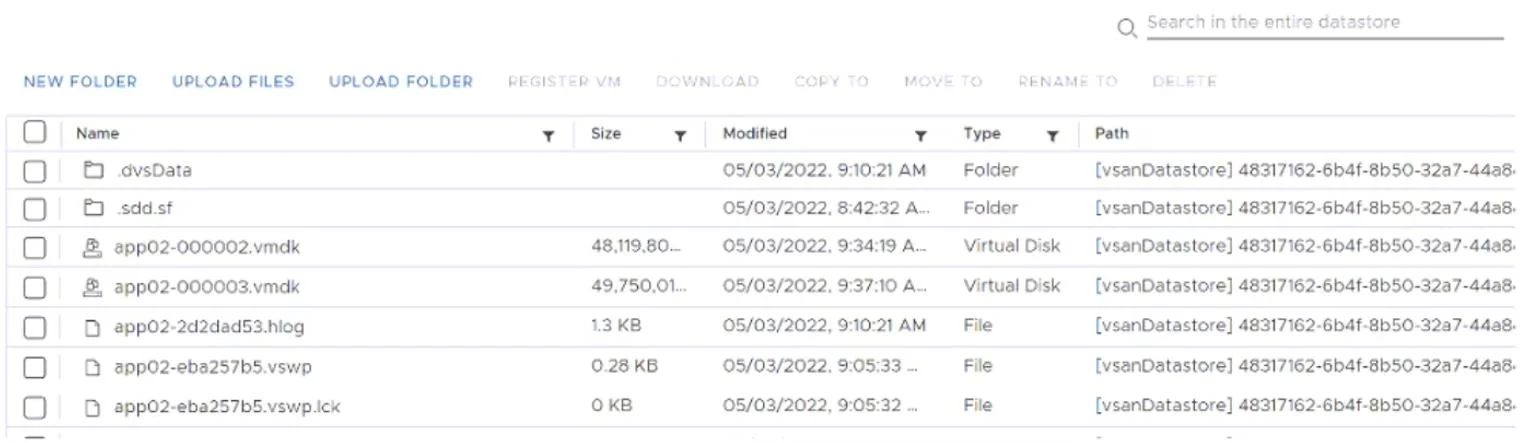
Refer to the exhibit. A cloud administrator is asked to troubleshoot a virtual machine (app02) that is performing slowly. The cloud administrator notices that app02 is consuming a larger than…
The correct answer is B. Perform a snapshot consolidation. When vCenter's Snapshot Manager shows no snapshots yet the datastore reveals orphaned delta VMDK files (e.g., app02-000001.vmdk), the snapshot metadata is out of sync with the actual disk state - Snapshot Consolidation (VM > Snapshots > Consolidate) detects these hidden delta…
Question
Refer to the exhibit. A cloud administrator is asked to troubleshoot a virtual machine (app02) that is performing slowly. The cloud administrator notices that app02 is consuming a larger than expected amount of disk space. As a first step, the cloud administrator uses VMware vCenter to check the snapshot manager for app02 and no snapshots are displayed. The cloud administrator then navigates to the app02 files on the datastore, and is presented with the information provided in the exhibit. Given the information provided, which task should the cloud administrator perform to resolve this issue?
Exhibit
Options
- AMigrate the virtual machine to a new datastore.
- BPerform a snapshot consolidation.
- CPower cycle the virtual machine.
- DExecute a Delete All Snapshots task.
How the community answered
(25 responses)- A8% (2)
- B44% (11)
- C28% (7)
- D20% (5)
Explanation
When vCenter's Snapshot Manager shows no snapshots yet the datastore reveals orphaned delta VMDK files (e.g., app02-000001.vmdk), the snapshot metadata is out of sync with the actual disk state - Snapshot Consolidation (VM > Snapshots > Consolidate) detects these hidden delta disks and merges them back into the base VMDK, reclaiming the excess disk space and resolving the performance issue.
Why the distractors are wrong:
- A (Migrate to new datastore): The orphaned delta files travel with the VM during migration, so the excess disk consumption follows - nothing is resolved.
- C (Power cycle): Rebooting the guest OS has no effect on files sitting on the datastore; the delta disks remain untouched.
- D (Delete All Snapshots): Because vCenter's Snapshot Manager sees no snapshots, this task has nothing to act on from vCenter's perspective - it won't touch the orphaned delta files that exist only at the storage layer.
Memory tip: Think of it as a mismatch problem - "vCenter sees nothing, datastore sees delta files = Consolidate to reconcile." Consolidation is specifically designed for this gap between what vCenter tracks and what physically exists on disk.
Topics
Community Discussion
No community discussion yet for this question.