
Broadcom-VMware
2V0-31.20 · Question #5
Refer to the exhibit. An administrator is testing a newly created Windows 2016 blueprint in Cloud Assembly. While using the Test option from within the blueprint, the attached error appears. What is…
The correct answer is A. The network profile created did not have the correct capability tag. https://docs.vmware.com/en/vRealize-Automation/8.2/vrealize-automation-transition/GUID- F3541BFC-E154-4E76-8845-FAF4E40632E3.html
Section 7 – Troubleshoot vRealize Automation
Question
Refer to the exhibit. An administrator is testing a newly created Windows 2016 blueprint in Cloud Assembly. While using the Test option from within the blueprint, the attached error appears. What is a possible cause for this error message?
Exhibit
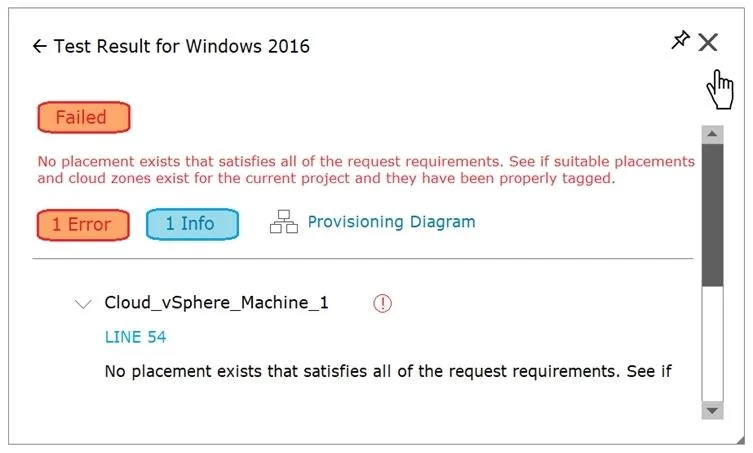
Options
- AThe network profile created did not have the correct capability tag.
- BDuring the machine allocation phase, Cloud Assembly could not find enough resources.
- CThe administrator did not associate a cloud zone to the project.
- DThe administrator did not add a cloud account.
How the community answered
(43 responses)- A79% (34)
- B2% (1)
- C7% (3)
- D12% (5)
Explanation
https://docs.vmware.com/en/vRealize-Automation/8.2/vrealize-automation-transition/GUID- F3541BFC-E154-4E76-8845-FAF4E40632E3.html
Topics
#blueprint testing#capability tags#network profiles#Cloud Assembly errors
Community Discussion
No community discussion yet for this question.