
2V0-21.20 · Question #8
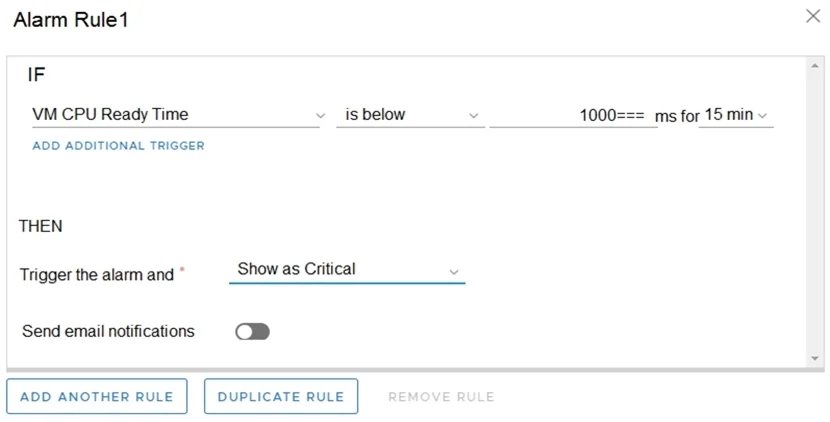
Refer to the exhibit. An administrator is consistently receiving an alarm regarding a CPU performance issue; however, there is NO CPU issue identified. What can the administrator do to make sure the…
The correct answer is A. Change 'is below' to 'is above.'. The alarm is misconfigured with an 'is below' condition on VM CPU Ready Time. CPU Ready Time measures how long a VM is waiting for a physical CPU - a HIGH value indicates a problem, not a low one. With 'is below,' the alarm fires when CPU Ready Time is low (i.e., when things…
Question
Refer to the exhibit. An administrator is consistently receiving an alarm regarding a CPU performance issue; however, there is NO CPU issue identified. What can the administrator do to make sure the alarm is triggered when there is an actual CPU performance issue?
Exhibits
Options
- AChange 'is below' to 'is above.'
- BChange 'Show as Critical' to 'Show as Warning.'
- CChange 'VM CPU Ready Time' to 'VM Memory Usage.'
- DChange 'VM CPU Ready Time' to VM CPU Usage.'
How the community answered
(14 responses)- A43% (6)
- B14% (2)
- C36% (5)
- D7% (1)
Explanation
The alarm is misconfigured with an 'is below' condition on VM CPU Ready Time. CPU Ready Time measures how long a VM is waiting for a physical CPU - a HIGH value indicates a problem, not a low one. With 'is below,' the alarm fires when CPU Ready Time is low (i.e., when things are fine), which is backwards. Changing the condition to 'is above' ensures the alarm only triggers when CPU Ready Time exceeds the threshold, meaning a real contention or performance problem exists. The other options are red herrings: changing severity (B) doesn't fix the logic, and swapping metrics (C, D) doesn't address the inverted condition.
Topics
Community Discussion
No community discussion yet for this question.