
220-1002 · Question #494
A technician is performing service on a computer and notices it is responding very slowly. The computer has 4GB of RAM, a four-core 3GHz processor, and a SATA 1TB 5400rpm 300GB HOD. The technician…
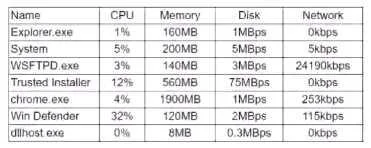
The correct answer is C. The chrome application is using too much memory and causing excessive paging. The system has only 4GB of RAM and a slow 5400 RPM SATA hard drive. When Chrome consumes an excessive amount of RAM, the operating system is forced to use the hard drive as virtual memory (a process called paging or swapping). A slow mechanical HDD used for paging creates a…
Question
A technician is performing service on a computer and notices it is responding very slowly. The computer has 4GB of RAM, a four-core 3GHz processor, and a SATA 1TB 5400rpm 300GB HOD. The technician logs the following process information:
Based on this data, which of the following is the MOST likely cause of the performance issues?
Exhibit
Options
- AThe dtfhost.exe is likely a virus, and the computer has slowed down due to an infection
- BThe WSFTPD application is overloading the NIC, causing the computer to breeze periodically.
- CThe chrome application is using too much memory and causing excessive paging
- DThe operating system is performing an installation that is slowing own the computer.
- EThe Windows Defender application is using too much CPU, causing the slowdown.
How the community answered
(21 responses)- A5% (1)
- B10% (2)
- C57% (12)
- D24% (5)
- E5% (1)
Explanation
The system has only 4GB of RAM and a slow 5400 RPM SATA hard drive. When Chrome consumes an excessive amount of RAM, the operating system is forced to use the hard drive as virtual memory (a process called paging or swapping). A slow mechanical HDD used for paging creates a massive I/O bottleneck, dramatically degrading system performance. This explains the sluggishness without necessarily spiking CPU usage to obvious levels. The other options lack supporting evidence: no data confirms dtfhost.exe is malicious (A), NIC overloading from FTP would cause network issues not general slowness (B), a Windows installation would be visible (D), and Windows Defender high CPU usage would show up as a CPU bottleneck, not a RAM/paging scenario (E).
Topics
Community Discussion
No community discussion yet for this question.