
210-255 · Question #183
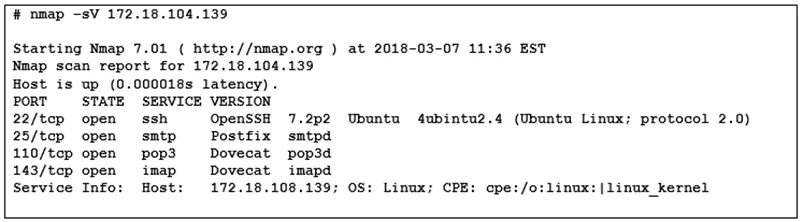
Refer to the exhibit. What does the output indicate about the server with IP address 172.18.104.139?
The correct answer is D. open ports of an email server. The scan output for 172.18.104.139 shows open ports associated with email server protocols such as SMTP, POP3, and IMAP.
Question
Refer to the exhibit. What does the output indicate about the server with IP address 172.18.104.139?
Exhibit
Options
- Aopen port of an FTP server
- Bopen ports of a web server
- Crunning processes of the server
- Dopen ports of an email server
How the community answered
(32 responses)- A13% (4)
- B9% (3)
- C3% (1)
- D75% (24)
Why each option
The scan output for 172.18.104.139 shows open ports associated with email server protocols such as SMTP, POP3, and IMAP.
FTP servers use ports 20 and 21; the output does not show these ports open on the target host.
Web servers primarily expose ports 80 (HTTP) and 443 (HTTPS), which are not the ports shown in the exhibit output.
Running processes are displayed via OS-level commands such as 'ps' or 'tasklist', not port scan output.
Email servers expose ports such as 25 (SMTP), 110 (POP3), 143 (IMAP), 465 or 587 (SMTP over TLS), 993 (IMAPS), and 995 (POP3S). The exhibit output shows a combination of these email-related ports open on the target host, which identifies it as an email server rather than a web or FTP server.
Concept tested: Identifying email server from open port scan output
Source: https://www.iana.org/assignments/service-names-port-numbers/service-names-port-numbers.xhtml
Topics
Community Discussion
No community discussion yet for this question.