
201 · Question #191
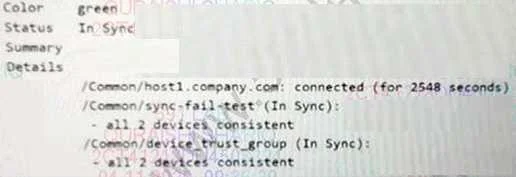
Refer to the exhibit. Which TMSH command generated this output?
The correct answer is D. tmsh show /cm sync status. The tmsh show /cm sync status command is used to display the current synchronization status of the BIG-IP device within a device group, showing if it is synchronized with its peers.
Question
Refer to the exhibit. Which TMSH command generated this output?
Exhibit
Options
- Atmsh list /cm sync-status
- Btmsh show /sys sync-status
- Ctmsh list /sys sync-status
- Dtmsh show /cm sync status
How the community answered
(34 responses)- A6% (2)
- B3% (1)
- C3% (1)
- D88% (30)
Why each option
The tmsh show /cm sync status command is used to display the current synchronization status of the BIG-IP device within a device group, showing if it is synchronized with its peers.
The list command is used to display configuration objects and their attributes, not the operational status of a component like sync status.
While show is correct for status, /sys typically refers to system-wide information (e.g., system failover), whereas /cm specifically relates to ConfigSync status.
This command uses list which is for displaying configuration, not operational status, and /sys is not the primary path for ConfigSync status.
The tmsh show /cm sync status command is the correct TMSH syntax to display the configuration synchronization status for the current device group, indicating whether the device is in sync with its peer. The /cm path refers to Cluster Member (ConfigSync) related commands, and 'sync status' specifies the desired information.
Concept tested: BIG-IP TMSH ConfigSync status command
Source: https://techdocs.f5.com/en-us/bigip-15-1-0/big-ip-system-administration/viewing-device-group-and-sync-status.html
Topics
Community Discussion
No community discussion yet for this question.