
200-901 · Question #95
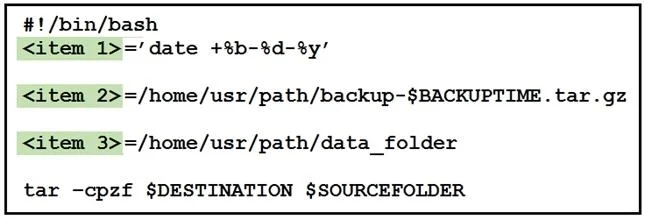
Drag and Drop Question Refer to the exhibit. Drag and drop the variables from the left onto the item numbers on the right that match the missing assignments in the exhibit. Answer:
The correct answer is BACKUPTIME; DESTINATION; SOURCEFOLDER. The question requires matching Bash script variable names to their correct assignments based on their usage in a tar command and the context of a backup script.
Question
Exhibit
Answer Area
Drag items
Correct arrangement
- BACKUPTIME
- DESTINATION
- SOURCEFOLDER
Explanation
The question requires matching Bash script variable names to their correct assignments based on their usage in a tar command and the context of a backup script.
Approach. To correctly answer this drag-and-drop question, we need to analyze the context of each variable assignment and its subsequent use in the tar command.
- <item 1>=' date +%b-%d-%y': This line assigns the output of the
datecommand, formatted as 'month-day-year', to a variable. Thetarcommand, though not directly using this variable, shows that$BACKUPTIMEis concatenated into the backup filename (e.g.,backup-$BACKUPTIME.tar.gz). Therefore, <item 1> should be BACKUPTIME. - <item 2>=/home/usr/path/backup-$BACKUPTIME.tar.gz: This line defines the full path and filename for the resulting backup archive. In the
tar -cpzf $DESTINATION $SOURCEFOLDERcommand,$DESTINATIONis the argument for the output archive file. Thus, <item 2> should be DESTINATION. - <item 3>=/home/usr/path/data_folder: This line defines the specific directory that needs to be backed up. In the
tar -cpzf $DESTINATION $SOURCEFOLDERcommand,$SOURCEFOLDERis the argument for the input directory to be archived. Hence, <item 3> should be SOURCEFOLDER.
Therefore, the correct assignments are:
- <item 1> - BACKUPTIME
- <item 2> - DESTINATION
- <item 3> - SOURCEFOLDER
Common mistakes.
- common_mistake. A common mistake would be to confuse the roles of
DESTINATIONandSOURCEFOLDER. Some test-takers might incorrectly assume that/home/usr/path/data_folderis the destination for the backup, rather than the source data being backed up. Conversely, they might think/home/usr/path/backup-$BACKUPTIME.tar.gzis the source, when it clearly defines the output filename. Another mistake could be misinterpretingBACKUPTIME's role, perhaps assigning it to the full path of the archive instead of just the date component that gets embedded within that path. Understanding thetarcommand's arguments (output file vs. input directory) is crucial to avoid these errors.
Concept tested. Bash scripting fundamentals, including variable assignment, understanding shell command output (e.g., date), and the usage of the tar command for archiving and compression (specifically the -z for gzip and -f for filename options). It also tests the ability to interpret variable substitution and flow within a script.
Topics
Community Discussion
No community discussion yet for this question.