
200-901 · Question #93
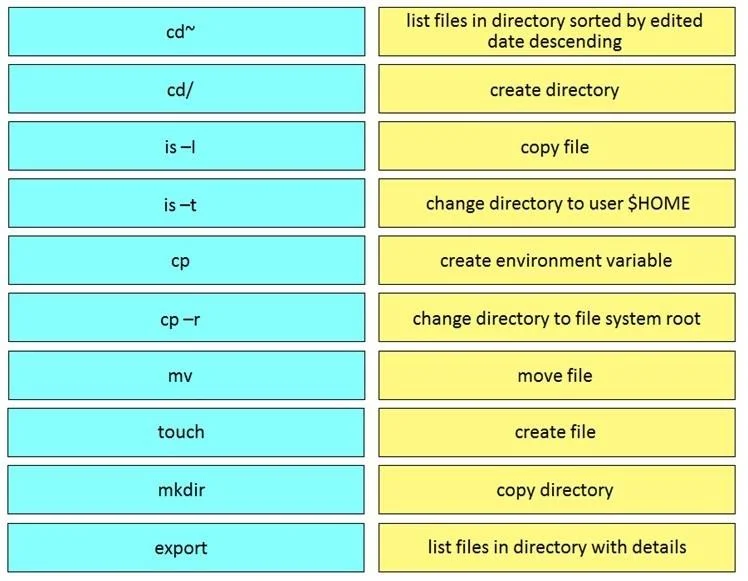
Drag and Drop Question Drag and Drop the Bash commands from the left onto the correct actions on the right. Answer:
The correct answer is is -t; mkdir; cp; cd~; export; cd/; mv; touch; cp -r; is -l. This question assesses the test-taker's fundamental knowledge of common Linux Bash shell commands for file system navigation, file and directory manipulation, and environment variable management.
Question
Drag and Drop Question Drag and Drop the Bash commands from the left onto the correct actions on the right. Answer:
Exhibit
Answer Area
Drag items
Correct arrangement
- is -t
- mkdir
- cp
- cd~
- export
- cd/
- mv
- touch
- cp -r
- is -l
Explanation
This question assesses the test-taker's fundamental knowledge of common Linux Bash shell commands for file system navigation, file and directory manipulation, and environment variable management.
Approach. The test-taker must drag each Bash command from the left-hand side to its correct action/description on the right-hand side. The correct pairings are as follows:
- Drag 'cd~' to 'change directory to user $HOME'. The tilde (~) is a shortcut for the current user's home directory.
- Drag 'cd/' to 'change directory to file system root'. The forward slash (/) represents the root directory of the file system.
- Drag 'ls -l' to 'list files in directory with details'. The '-l' option provides a long listing format, showing detailed information.
- Drag 'ls -t' to 'list files in directory sorted by edited date descending'. The '-t' option sorts by modification time, newest first.
- Drag 'cp' to 'copy file'. This is the basic command to copy files.
- Drag 'cp -r' to 'copy directory'. The '-r' or '--recursive' option is required to copy directories and their contents.
- Drag 'mv' to 'move file'. This command is used to move or rename files and directories.
- Drag 'touch' to 'create file'. The 'touch' command is primarily used to change file timestamps, but it also creates an empty file if it doesn't exist.
- Drag 'mkdir' to 'create directory'. This command is used to make new directories.
- Drag 'export' to 'create environment variable'. The 'export' command sets an environment variable to be available to child processes.
Common mistakes.
- common_mistake. A common mistake would be confusing commands with similar functionality or options. For example:
- Dragging 'ls -l' to 'list files in directory sorted by edited date descending' (which is for 'ls -t') or vice versa. '-l' provides details, while '-t' sorts by time.
- Dragging 'cp' to 'copy directory' (which requires 'cp -r'). The base 'cp' command is for files, not directories.
- Dragging 'touch' to 'create directory' (which is for 'mkdir'). 'touch' creates files, 'mkdir' creates directories.
- Incorrectly associating 'export' with file operations rather than environment variables, as 'export' is distinct from file/directory commands.
Concept tested. Core Linux/Unix Bash shell commands for file system navigation, file and directory management, and environment variable manipulation.
Topics
Community Discussion
No community discussion yet for this question.