
200-901 · Question #572
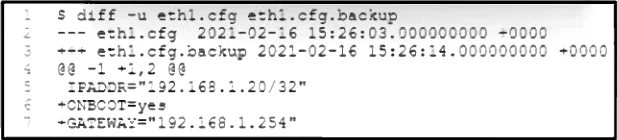
Refer to the exhibit. A network engineer changes the configuration of a device interface, and the device becomes unreachable. The engineer accesses the server console to review the differences with…
The correct answer is A. Remove the line GATEWAY="192.168.1.254". After a configuration change made a network device unreachable, the engineer must restore the original default gateway setting to re-establish network connectivity.
Question
Refer to the exhibit. A network engineer changes the configuration of a device interface, and the device becomes unreachable. The engineer accesses the server console to review the differences with the backup file. Which change must be made in the eth1.cfg file to restore the original configuration?
Exhibit
Options
- ARemove the line GATEWAY="192.168.1.254".
- BRemove the line IPADDR="192.168.1.20/32".
- CAdd lines ONBOOT=yes and GATEWAY="192.168.1.254".
- DAdd lines ONBOOT=yes and IPADDR="192.168.1.20/32".
How the community answered
(45 responses)- A84% (38)
- B2% (1)
- C4% (2)
- D9% (4)
Why each option
After a configuration change made a network device unreachable, the engineer must restore the original default gateway setting to re-establish network connectivity.
To restore the original configuration and global network reachability, the `GATEWAY="192.168.1.254"` line must be added back to the `eth1.cfg` file. Its absence prevents the device from using a default route to reach external networks, leading to unreachability.
Removing the IP address entirely would render the device completely unaddressable and unable to communicate.
While adding `ONBOOT=yes` and `GATEWAY="192.168.1.254"` partially restores the original configuration, the `IPADDR="192.168.1.20/32"` subnet mask in the modified config would still prevent local communication with the gateway.
Keeping `IPADDR="192.168.1.20/32"` (a host route) prevents the device from communicating with other hosts on the `192.168.1.0/24` subnet, including its gateway, thus not restoring reachability.
Concept tested: Linux network interface configuration restoration
Source: https://access.redhat.com/documentation/en-us/red_hat_enterprise_linux/7/html/networking_guide/sec-configuring_a_static_ip_address_with_ifcfg_files
Topics
Community Discussion
No community discussion yet for this question.