
200-901 · Question #563
Drag and Drop Question Refer to the exhibit. A script must create a new team, create a new space, send a message, and create a participant. Drag and drop the code snippets from the bottom onto the…
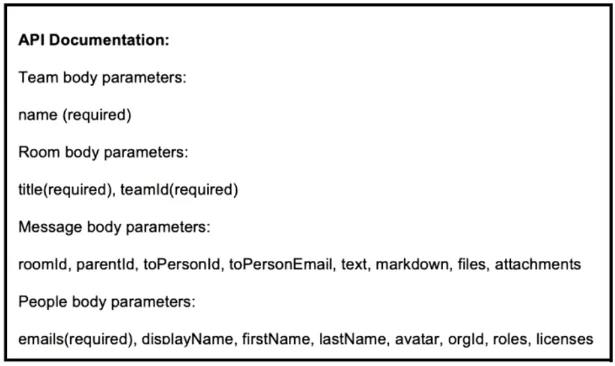
The correct answer is {"name": "New example collaboration"}; {"title": "newRoom", "teamId": team_id}; {"roomID": room_id, "text": "New text"}; {"emails": [email], "displayName": name}. This question assesses the ability to construct valid JSON request bodies for various API endpoints based on provided API documentation and a Python script's context.
Question
Drag and Drop Question Refer to the exhibit. A script must create a new team, create a new space, send a message, and create a participant. Drag and drop the code snippets from the bottom onto the boxes in the code to complete the script. Not all options are used. Answer:
Exhibit
Answer Area
Drag items
Correct arrangement
- {"name": "New example collaboration"}
- {"title": "newRoom", "teamId": team_id}
- {"roomID": room_id, "text": "New text"}
- {"emails": [email], "displayName": name}
Explanation
This question assesses the ability to construct valid JSON request bodies for various API endpoints based on provided API documentation and a Python script's context.
Approach. The correct approach involves carefully matching the API endpoint being called in the script with its corresponding body parameters listed in the API documentation, then selecting the drag-and-drop snippet that provides the required parameters using the available variables.
- Create Team (
/teamsendpoint): The API documentation specifies 'name' as a required parameter for a Team. The snippet{"name": "New example collaboration"}correctly provides this parameter. This snippet is dragged to the firstbody =line. - Create Room (
/roomsendpoint): The API documentation requires 'title' and 'teamId' for a Room. The script has previously obtainedteam_id. The snippet{"title": "newRoom", "teamId": team_id}correctly provides both required parameters. This snippet is dragged to the secondbody =line. - Send Message (
/messagesendpoint): The API documentation lists 'roomId' and 'text' as relevant parameters for messages. The script has previously obtainedroom_id. The snippet{"room_id": room_id, "text": "New text"}provides the room identifier and message content. While the API documentation uses 'roomId' (camelCase) and the snippet uses 'room_id' (snake_case), this is the only available option that correctly provides both the room identifier (using theroom_idvariable) and the message text. This snippet is dragged to the thirdbody =line. - Create Participant (
/peopleendpoint): The API documentation specifies 'emails' as a required parameter and 'displayName' as a common optional parameter for People. The script definesemailandname. The snippet{"emails": [email], "displayName": name}correctly provides the required 'emails' using theemailvariable and 'displayName' using thenamevariable, matching the documented parameter name. This snippet is dragged to the fourthbody =line.
Common mistakes.
- common_mistake. Common mistakes include:
- Ignoring required parameters: Forgetting a required parameter, such as selecting
{"title": "New example collaboration"}for Room creation, which is missing the requiredteamId. - Mismatched parameter names: Using an incorrect key name, such as
{"name": "newRoom", "teamId": team_id}for Room creation when the API documentation explicitly requires 'title', not 'name'. Another example is using{"emails": [email], "name": name}for People creation, where the API documentation specifies 'displayName', not 'name'. - Disregarding case sensitivity or conventions: While the message body option uses
room_idinstead of the documentedroomId, selecting any other option would result in missing critical parameters or using entirely incorrect ones. The provided options force the test-taker to choose the functionally closest match. Other options for messages, if available, might include an incorrect variable name or missing text content. - Not utilizing existing variables: Failing to use variables like
team_idorroom_idthat were obtained from previous API calls, oremailandnamedefined at the script's beginning.
Concept tested. The core concept tested is the ability to interpret API documentation for RESTful services, correctly construct JSON request bodies, and integrate these API calls into a programmatic context (Python script). This involves understanding required parameters, data types, variable usage, and attention to detail in parameter naming conventions.
Topics
Community Discussion
No community discussion yet for this question.