
200-901 · Question #560
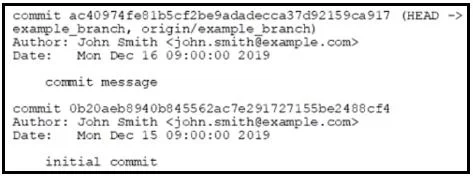
Drag and Drop Question Refer to the exhibit. Running the git merge example_branch command results in an error due to conflicts. The exhibit shows the output of the git log command on a branch named…
The correct answer is connects to the server; creates variables for remote execution; places a new application version on the server; installs the application; restarts the application. To resolve conflicts and merge a feature branch into the remote master, the correct sequence involves aborting the initial merge attempt, preparing the feature branch by reverting the problematic commit, merging master into it, reapplying the changes, and finally merging the…
Question
Drag and Drop Question Refer to the exhibit. Running the git merge example_branch command results in an error due to conflicts. The exhibit shows the output of the git log command on a branch named example_branch. Drag and drop the code from the bottom into the order to resolve the conflicts and merge example_branch into the remote master branch. Answer:
Exhibit
Answer Area
Drag items
Correct arrangement
- connects to the server
- creates variables for remote execution
- places a new application version on the server
- installs the application
- restarts the application
Explanation
To resolve conflicts and merge a feature branch into the remote master, the correct sequence involves aborting the initial merge attempt, preparing the feature branch by reverting the problematic commit, merging master into it, reapplying the changes, and finally merging the feature branch into master and pushing.
Approach. The core problem is an existing merge conflict when attempting to merge example_branch into master. The goal is to resolve this and push the changes. A common strategy for complex conflicts is to temporarily remove the conflicting changes from the feature branch, integrate the target branch's changes, then reintroduce the feature branch's changes while resolving conflicts, and finally perform a clean merge.
Here is the correct sequence and reasoning:
-
git reset --hard && git checkout example_branch(step 1):git reset --hard: When a merge fails, the repository is left in a conflicted state on the current branch (implicitlymasterbecause that's wheregit merge example_branchwas run). This command aborts the failed merge attempt and resets themasterbranch to its state before the merge attempt, discarding all changes and restoring a clean working directory.&& git checkout example_branch: Aftermasteris cleaned, switch toexample_branch. This allows us to work on the feature branch to prepare it for a clean merge.
-
git revert ac40974fe8 && git merge master(step 2):git revert ac40974fe8: Now onexample_branch. Thegit logshowsac40974fe8as the latest commit onexample_branch. Assuming this commit is the primary source of conflict withmaster,git revertcreates a new commit onexample_branchthat undoes the changes introduced byac40974fe8. This temporarily removes the problematic changes, makingexample_branch'less conflicting' for the next step.&& git merge master: After reverting the specific commit, mergemasterintoexample_branch. This brings all recent changes frommasterintoexample_branch, effectively updatingexample_branchwithmaster's history. Sinceac40974fe8's changes were reverted, this merge should encounter fewer (or no) conflicts related to that specific commit, allowingexample_branchto be up-to-date withmaster.
-
Reapply the change and run "git add -A && git commit"(step 3):- Since
ac40974fe8was reverted, its desired changes are no longer present inexample_branch. This step involves manually re-adding or reconstructing those changes in the working directory ofexample_branch. During this reapplication, any conflicts with the newly mergedmasterchanges (from step 2) must be resolved manually. Once the changes are reapplied and conflicts resolved,git add -Astages all modifications, andgit commitsaves them as a new commit onexample_branch. At this point,example_branchcontains all desired changes, is fully up-to-date withmaster, and all conflicts are resolved withinexample_branchitself.
- Since
-
git checkout master && git merge example_branch(step 4):git checkout master: Switch back to themasterbranch.&& git merge example_branch: Now thatexample_branchhas been fully updated withmaster's changes and has resolved its own changes against them, mergingexample_branchintomastershould be a clean operation, likely a fast-forward merge or a trivial merge commit, as all conflicts have already been handled.
-
git push(step 5):- After the successful merge on the local
masterbranch, this command pushes the updatedmasterbranch to the remote repository, completing the task.
- After the successful merge on the local
Common mistakes.
- common_mistake. One common mistake is to attempt to merge or push changes before conflicts are fully resolved or without preparing the branches correctly. For example:
- Placing
git checkout master && git merge example_branchearly (e.g., as step 1 or 2): This command is precisely what led to the conflict, or it would re-introduce the conflict if the branches aren't prepared. It cannot be performed successfully untilexample_branchhas been brought up-to-date withmasterand its own conflicting changes resolved. - Placing
git pushanywhere but the last step:git pushis used to send local changes to the remote repository. It can only be done after all local commits and merges are complete and successful. - Using
git revert ac40974fe8 && git merge masterwithout first cleaning up the conflicted state onmasterand switching toexample_branch:git revertoperates on the currently checked-out branch. If still onmasterin a conflicted state,git revertwouldn't correctly target a commit onexample_branchin a meaningful way to resolve the merge conflict, andgit merge masterwould be merging master into itself or still be in a conflicted state, which is not productive for conflict resolution.
Concept tested. Git conflict resolution strategies, understanding Git merge workflow, git reset, git checkout, git revert, git merge, git add, git commit, and git push commands, and the ability to sequence these operations logically to achieve a desired state in a distributed version control system.
Reference. null
Topics
Community Discussion
No community discussion yet for this question.