
200-901 · Question #444
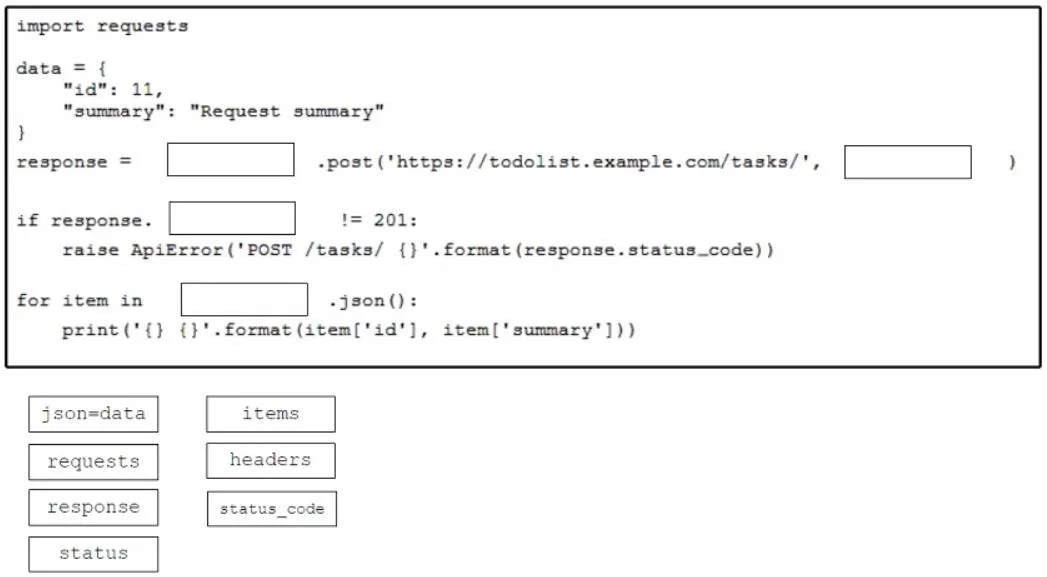
Drag and Drop Question Drag and drop the code from the bottom onto the box where the code is missing to construct a Python script that calls a REST API request. Not all options are used. Answer:
The correct answer is requests; json=data; status_code; response. The question tests the ability to construct a Python script using the 'requests' library to make a REST API POST call, handle the response status, and parse JSON data.
Question
Drag and Drop Question Drag and drop the code from the bottom onto the box where the code is missing to construct a Python script that calls a REST API request. Not all options are used. Answer:
Exhibit
Answer Area
Drag items
Correct arrangement
- requests
- json=data
- status_code
- response
Explanation
The question tests the ability to construct a Python script using the 'requests' library to make a REST API POST call, handle the response status, and parse JSON data.
Approach. The correct interaction involves dragging the appropriate code snippets into the four blank spaces:
response =requests.post(...): Theimport requestsstatement at the top indicates that therequestslibrary is being used. To call thepostmethod, it must be invoked on therequestsobject itself. Therefore, 'requests' should be dragged into the first blank.response = requests.post('...',json=data): Thedatavariable is a Python dictionary intended to be sent as JSON in the POST request body. Therequestslibrary'spostmethod accepts ajsonparameter for this purpose. Therefore, 'json=data' should be dragged into the second blank.if response.status_code!= 201:: This line is checking the HTTP status code returned by the API call. Therequestslibrary stores the HTTP status code in thestatus_codeattribute of the response object. Therefore, 'status_code' should be dragged into the third blank.for item inresponse.json():: This loop iterates over the JSON content received in the API response. Thejson()method is called on the response object itself to parse its JSON body. Therefore, 'response' should be dragged into the fourth blank.
Common mistakes.
- common_mistake. Common mistakes include:
- Using 'data=data' instead of 'json=data' for JSON payloads: While
data=datacan send form-encoded data, for sending JSON, therequestslibrary specifically uses thejsonparameter to automatically serialize the Python dictionary to a JSON string and set the 'Content-Type: application/json' header. Usingdata=datafor a dictionary would send it as 'application/x-www-form-urlencoded' unless explicitly serialized. - Using 'status' instead of 'status_code': The
requestslibrary's response object has an attribute namedstatus_code(an integer) for the HTTP status code, notstatus. - Using 'items' or 'headers' inappropriately: 'items' is a method on dictionaries, not directly related to the
requestsobject for iteration in this context. 'headers' is an attribute of the response object containing HTTP headers, not the main data payload for iteration or the object to call.post()on. - Calling
.json()on 'data' or 'items':datais the input payload, not the response. 'items' is not a valid object here to call.json()on;.json()must be called on theresponseobject.
Concept tested. This question tests the practical application of the Python 'requests' library for making HTTP POST requests, sending JSON data, handling HTTP response status codes, and parsing JSON responses from a REST API.
Topics
Community Discussion
No community discussion yet for this question.