
200-901 · Question #426
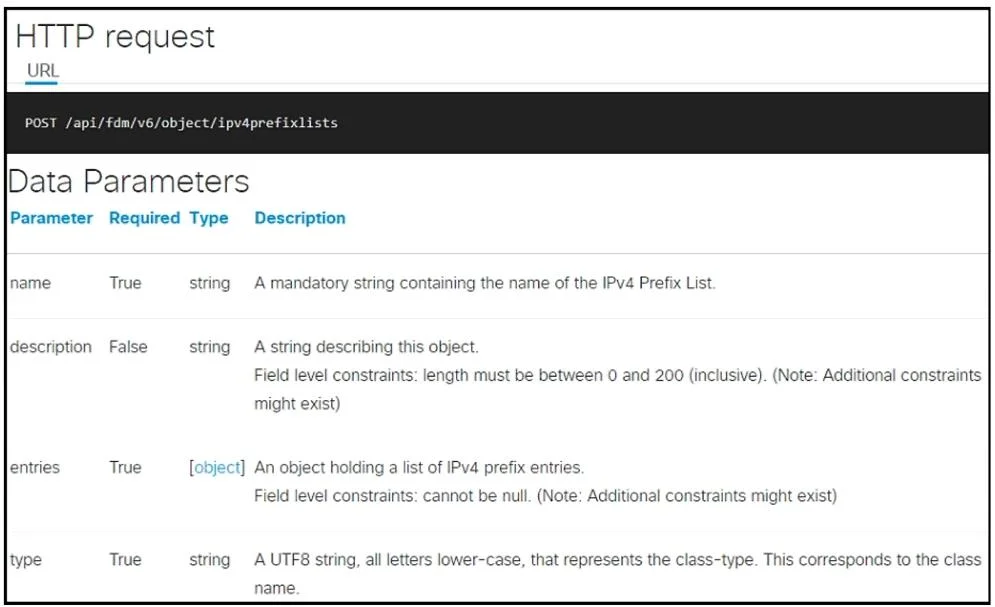
Drag and Drop Question Refer to the exhibit. Drag and drop the code from the bottom onto the box where the code is missing to construct an API request that creates a new IPv4 prefix. Not all options…
The correct answer is BASE_URL; ipv4prefixlist; token; POST. This question tests the ability to construct a REST API request in Python by correctly identifying the HTTP method, URL components, request body parameters, and authentication headers from API documentation.
Question
Drag and Drop Question Refer to the exhibit. Drag and drop the code from the bottom onto the box where the code is missing to construct an API request that creates a new IPv4 prefix. Not all options are used. Answer:
Exhibit
Answer Area
Drag items
Correct arrangement
- BASE_URL
- ipv4prefixlist
- token
- POST
Explanation
This question tests the ability to construct a REST API request in Python by correctly identifying the HTTP method, URL components, request body parameters, and authentication headers from API documentation.
Approach. To correctly complete the Python code, the test-taker must refer to the API documentation and understand common REST API patterns:
- First blank (
url = f'{ }'/object/ipv4prefixlists'): Theurlvariable is being constructed using an f-string. TheBASE_URLvariable is defined as'https://ftd.example.com/api/fdm/latest'. This is the base part of the API endpoint. DraggingBASE_URLcompletes the URL string correctly. - Second blank (
'type': ' 'within theentrieslist): The API documentation specifies that thetypeparameter (both for the main object and, by inference, for individual entries within theentriesarray) should represent the 'class-type' and correspond to the 'class name'. Given that the resource is an 'IPv4 Prefix List',ipv4prefixlistis the appropriate class name. Draggingipv4prefixlistensures the entry's type is correctly defined. - Third blank (
'Authorization': f'Bearer { }'): This is a standard authorization header. The value after 'Bearer ' is typically an access token. The code snippet defines a variabletokencontaining a sample bearer token. Draggingtokencorrectly populates the authorization header. - Fourth blank (
response = requests.request(' ', url, ...)): Therequests.requestmethod requires the HTTP method as its first argument. The API documentation explicitly states thatPOSTis the method for creating a new IPv4 prefix list. DraggingPOSTcorrectly specifies the HTTP operation.
Common mistakes.
- common_mistake. Common mistakes include:
- Dragging
GETinstead ofPOST:GETis used to retrieve data, whereas the documentation explicitly statesPOSTfor creating (new) resources. UsingGETwould result in an incorrect request. - Dragging
URLinstead ofBASE_URL: TheURLoption is a generic term, butBASE_URLis the specific variable defined in the Python script that holds the base portion of the API endpoint, making it the correct choice for string concatenation in the f-string. - Dragging
api_keyinstead oftoken: Whileapi_keyis a form of authentication, the headerAuthorization: f'Bearer { }'specifically indicates a Bearer token authentication scheme. Atokenvariable is explicitly defined in the script for this purpose, makingtokenthe precise and correct fit. - Misinterpreting the
typefield or using an incorrect value: Some might attempt to useURLorapi_keyhere, but the context clearly indicates a string representing the resource's class name, which isipv4prefixlistbased on the resource being managed.
Concept tested. This question tests the understanding of REST API request construction, including HTTP methods (POST), URL structure (base URL, endpoint path), request body (payload) composition, JSON data formatting, and authentication mechanisms (Bearer token) within the context of a Python requests library script. It also assesses the ability to interpret and apply information from API documentation.
Topics
Community Discussion
No community discussion yet for this question.