
200-901 · Question #419
Drag and Drop Question An engineer must make changes on a network device through the management platform API. The engineer prepares a script to send the request and analyze the response, check…
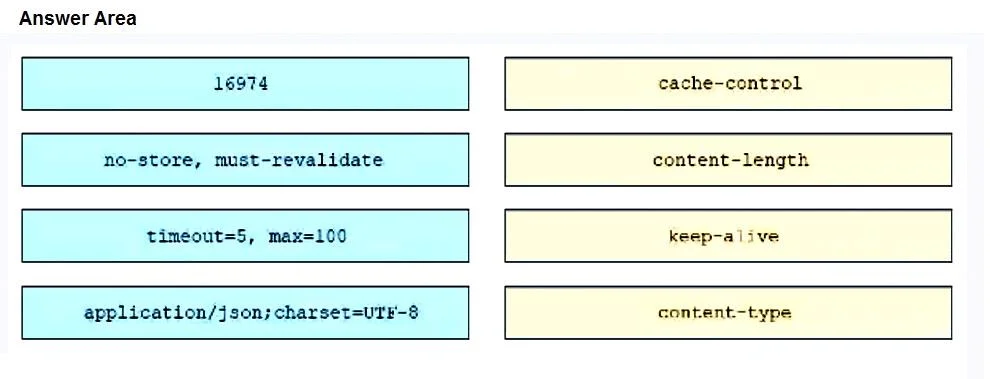
The correct answer is 16974 -> content-length; no-store, must-revalidate -> cache-control; timeout=5, max=100 -> keep-alive; application/json;charset=UTF-8 -> content-type. The question requires matching HTTP header values to their corresponding header names based on the typical format and purpose of each HTTP response header.
Question
Drag and Drop Question An engineer must make changes on a network device through the management platform API. The engineer prepares a script to send the request and analyze the response, check headers, and read the body according to information inside response headers. Drag and drop the HTTP header values from the left onto the elements of an HTTP response on the right. Answer:
Exhibit
Answer Area
Drag items
Correct arrangement
- 16974 -> content-length
- no-store, must-revalidate -> cache-control
- timeout=5, max=100 -> keep-alive
- application/json;charset=UTF-8 -> content-type
Explanation
The question requires matching HTTP header values to their corresponding header names based on the typical format and purpose of each HTTP response header.
Approach. The correct interaction involves dragging each value to its respective header name. Here's the breakdown:
- Drag 'no-store, must-revalidate' to 'cache-control': The
Cache-Controlheader is used to specify directives for caching mechanisms in both requests and responses. 'no-store, must-revalidate' are common directives indicating that a response should not be stored in a cache and must be revalidated with the origin server before use. - Drag '16974' to 'content-length': The
Content-Lengthheader indicates the size of the entity-body, in bytes, sent to the recipient. A numerical value like '16974' is typical for content length. - Drag 'timeout=5, max=100' to 'keep-alive': The
Keep-Aliveheader is used to signal how the connection should be handled. Directives like 'timeout' and 'max' are commonly used to specify how long an idle connection should be kept open and the maximum number of requests that can be sent over that connection. - Drag 'application/json;charset=UTF-8' to 'content-type': The
Content-Typeheader indicates the media type (e.g., MIME type) of the resource or data. 'application/json;charset=UTF-8' correctly specifies that the content is JSON formatted and encoded using UTF-8.
Common mistakes.
- common_mistake. A common mistake would be misinterpreting the purpose of each header. For example:
- Dragging '16974' to 'cache-control' would be incorrect because 'cache-control' specifies caching directives, not content size.
- Dragging 'application/json;charset=UTF-8' to 'content-length' would be wrong because 'content-length' is for size, not media type.
- Confusing 'keep-alive' directives ('timeout', 'max') with 'cache-control' directives ('no-store', 'must-revalidate') would also lead to an incorrect pairing. Each header has a distinct function and specific syntax for its values.
Concept tested. HTTP request/response headers, their structure, common values, and their specific purposes in API communication and web protocols. Specifically, understanding Cache-Control, Content-Length, Keep-Alive, and Content-Type headers.
Topics
Community Discussion
No community discussion yet for this question.