
200-901 · Question #291
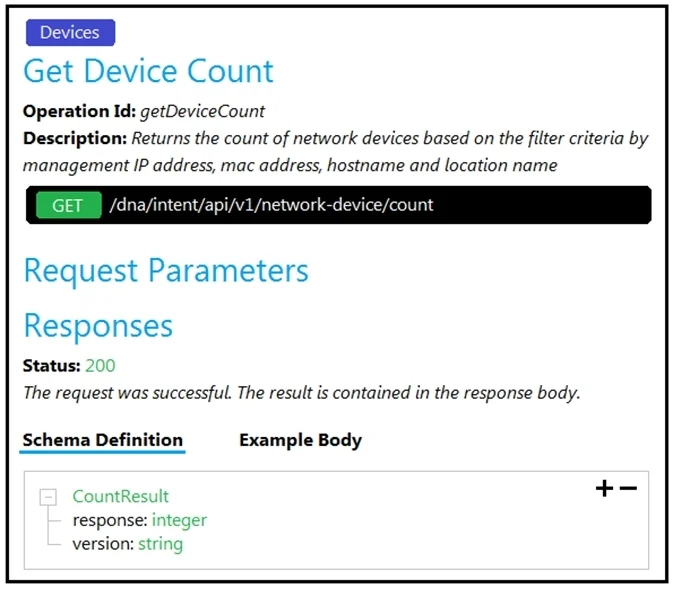
Drag and Drop Questions Refer to the exhibit. Drag and drop the code snippets from the bottom onto the blanks in the code to construct a request to find the Cisco DNA Center switch count. Not all…
The correct answer is application/json; networks; clients; Authorization: Bearer. This question tests the ability to construct a curl command to interact with a REST API, specifically to retrieve a device count from Cisco DNA Center, by correctly identifying the HTTP method, URL components, and request headers from provided API documentation.
Question
Drag and Drop Questions Refer to the exhibit. Drag and drop the code snippets from the bottom onto the blanks in the code to construct a request to find the Cisco DNA Center switch count. Not all options are used. Answer:
Exhibit
Answer Area
Drag items
Correct arrangement
- application/json
- networks
- clients
- Authorization: Bearer
Explanation
This question tests the ability to construct a curl command to interact with a REST API, specifically to retrieve a device count from Cisco DNA Center, by correctly identifying the HTTP method, URL components, and request headers from provided API documentation.
Approach. To construct the correct curl request, we must refer to the API documentation in the first image.
- The first blank follows
curl -L --request. The API documentation clearly states the HTTP method is 'GET'. Therefore, 'GET' should be dragged into the first blank. - The second blank follows
--. This is for specifying the URL. The standardcurloption for the URL is--url. Thus, 'url' should be dragged into the second blank. - The third blank is at the end of the URL:
https://dna/intent/api/v1/network-device/ <blank>. From the API documentation, the full endpoint is/dna/intent/api/v1/network-device/count. Therefore, 'count' should be dragged into the third blank. - The fourth blank is for the name of a header:
--header '<blank> : application/json'. TheAcceptheader is already specified. For a request sending or expecting JSON,Content-Typeis a common header for specifying the format of the request body (even if empty for GET) or the expected response. Given the options, 'Content-Type' is the correct header name to specifyapplication/jsonas the type of content being sent (or implicitly, the type of content expected ifAcceptwasn't also present). In this context, it often complementsAccept.
Following these steps, the correct placement of the draggable options into the blanks is:
- Blank 1:
GET - Blank 2:
url - Blank 3:
count - Blank 4:
Content-Type
Common mistakes.
- common_mistake. 1. Using 'POST' instead of 'GET' for the request method: The API documentation explicitly labels the operation as 'GET /dna/intent/api/v1/network-device/count'. 'POST' is used for creating new resources, not for retrieving a count of existing resources. Selecting 'POST' would result in an incorrect request.
- Using 'network' instead of 'url' for the URL option: The
curlcommand uses--urlto specify the target URL.--networkis not a standardcurloption for this purpose. - Placing 'network' in the URL path blank: The full API path is
/dna/intent/api/v1/network-device/count. The blank in thecurlcommand is specifically for the final segment 'count', not 'network'. - Misunderstanding HTTP headers: While
Accept: application/jsonis already provided, indicating the client expects a JSON response, the blank specifies an additional header withapplication/json. 'Content-Type' is the correct header name to specify the media type of the request body (even if empty for a GET request), or in some contexts, to reiterate the expected type. No other option fits as a valid HTTP header name in this context.
Concept tested. REST API interaction using curl, specifically understanding HTTP methods (GET), API endpoint structure, and common HTTP request headers (Content-Type, Accept), as well as interpreting API documentation.
Topics
Community Discussion
No community discussion yet for this question.