
200-901 · Question #166
Drag and Drop Question Drag and drop the code from the bottom onto the box where the code is missing in the Bash script to complete the missing assignment. Answer:
The correct answer is BACKUPTIME; DESTINATION; SOURCEFOLDER. This question tests the ability to correctly assign Bash script variables based on their context and usage in a file backup operation.
Question
Drag and Drop Question Drag and drop the code from the bottom onto the box where the code is missing in the Bash script to complete the missing assignment. Answer:
Exhibit
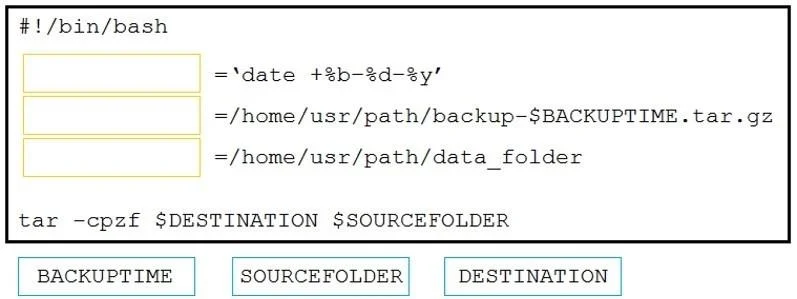
Answer Area
Drag items
Correct arrangement
- BACKUPTIME
- DESTINATION
- SOURCEFOLDER
Explanation
This question tests the ability to correctly assign Bash script variables based on their context and usage in a file backup operation.
Approach. The correct interaction involves dragging the variable names into the appropriate empty boxes based on their assigned values and their usage in the 'tar' command.
- The first assignment is
'date +%b-%d-%y'. This command substitution generates a timestamp string. Looking at the next line, the backup filename includes-$BACKUPTIME, indicating that this date string is intended for theBACKUPTIMEvariable. So, 'BACKUPTIME' should be dragged to the first box. - The second assignment is
/home/usr/path/backup-$BACKUPTIME.tar.gz. This is a full path for the output archive file. In thetarcommand (tar -cpzf $DESTINATION $SOURCEFOLDER), the-fflag (file) is followed by$DESTINATION, which specifies the name of the archive to be created. Therefore, 'DESTINATION' should be dragged to the second box. - The third assignment is
/home/usr/path/data_folder. This is a directory path that would typically be the source for a backup. In thetarcommand, the last argument,$SOURCEFOLDER, specifies the files or directories to be archived. Therefore, 'SOURCEFOLDER' should be dragged to the third box.
Common mistakes.
- common_mistake. A common mistake would be misinterpreting the arguments of the 'tar' command or not recognizing the role of each assigned value. For instance, swapping 'DESTINATION' and 'SOURCEFOLDER' is a frequent error if the test-taker is unfamiliar with
tar -f ARCHIVE_NAME SOURCE_PATHsyntax. Another mistake could be assigning 'BACKUPTIME' to a different variable, which would make the-$BACKUPTIMEplaceholder in the destination path incorrect or unresolved.
Concept tested. Bash scripting fundamentals, including variable assignment, command substitution, and understanding of common Linux commands like 'tar' for archiving and 'date' for generating timestamps. It also tests the ability to logically deduce variable purpose based on context and usage.
Topics
Community Discussion
No community discussion yet for this question.