
200-601 · Question #61
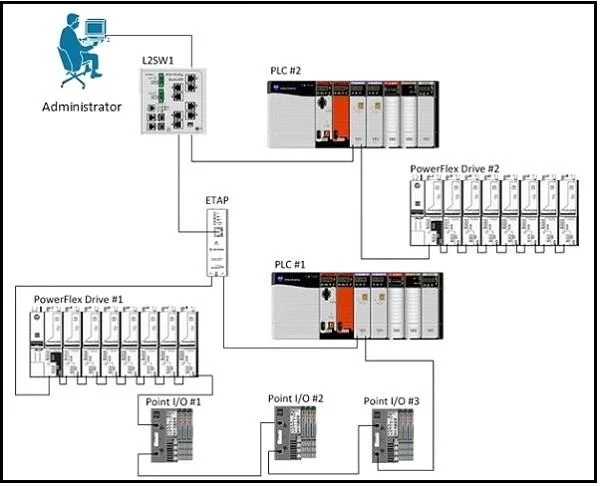
Refer to the exhibit. An expansion project added an E-Tap and Device Level Ring to interface FastEthernet1/1 of L2SW1. The administrator has looked at the logs of L2SW1 and found that…
The correct answer is C. The E-Tap is not configured as a ring supervisor causing a loop on interface FastEthernet1/1. See the full explanation below for the reasoning.
Question
Refer to the exhibit. An expansion project added an E-Tap and Device Level Ring to interface FastEthernet1/1 of L2SW1. The administrator has looked at the logs of L2SW1 and found that FastEthernet1/1 was in an error-disabled state.Using command line access on L2SW1, the administrator issued the following commands in configuration mode:
L2SW1(config)# interface FastEthernet 1/1 L2SW1(config-if)# shutdown L2SW1(config-if)# no shutdown The administrator checked the logs of L2SW1 and found the following:
Mar 30 02:23:17.588: %PM-4-ERR_DISABLE: bpduguard error detected on Fa1/1, putting Fa1/1 in err-disable state The administrator checked the software configuration of the switch port and found the following:
interface FastEthernet1/1 switchport access vlan 310 switchport mode access speed 100 duplex full no mdix auto spanning-tree portfast spanning-tree bpduguard enable Why has the port gone error-disabled?
Exhibit
Options
- Ainterface FastEthernet1/1 is configured as an access port on the wrong VLAN.
- BThere is a duplex mismatch between interface FastEthernet1/1 and the E-Tap.
- CThe E-Tap is not configured as a ring supervisor causing a loop on interface FastEthernet1/1.
- DThe E-Tap is configured at 10Mbps and the switch port is configured at 100Mbps.
- EAutomatic MDI Crossover detection is disabled.
How the community answered
(42 responses)- A2% (1)
- B7% (3)
- C74% (31)
- D14% (6)
- E2% (1)
Community Discussion
No community discussion yet for this question.