nerdexam
Cisco

200-301 · Question #690

Lab Simulation 8 Guidelines This is a lab item in which tasks will be performed on virtual devices. - Refer to the Tasks tab to view the tasks for this lab item. - Refer to the Topology tab to access

This lab requires configuring static routes using connected interfaces and next-hop IP addresses per company policy, with floating static routes (higher administrative distance) for redundancy. The correct approach involves configuring a static route on R2 to reach the SW1 LAN (1

Submitted by kevin_r· Mar 5, 2026CCNA Domain 3.0 – IP Connectivity: Configure and verify IPv4 and IPv6 static routing, including default routes and floating static routes for redundancy.

Question

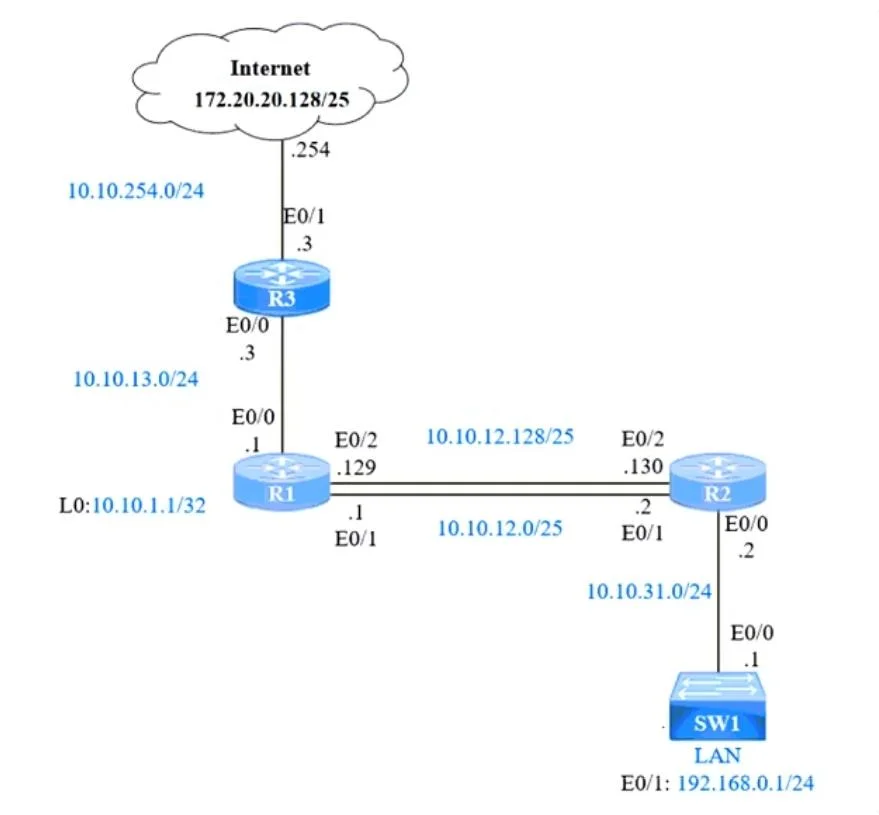
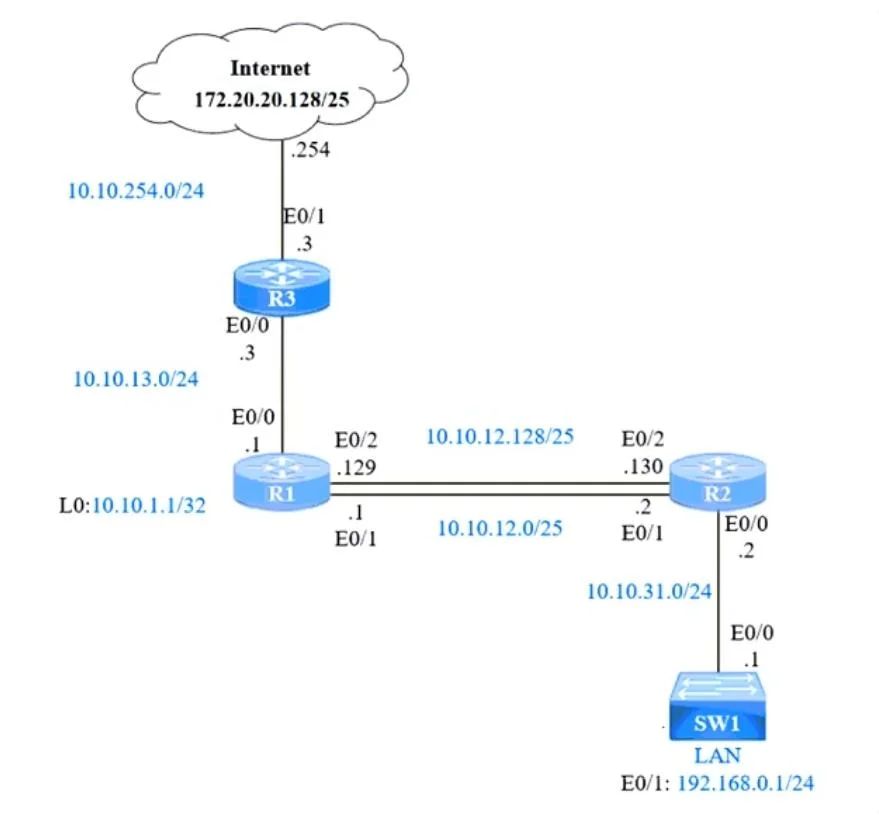
Lab Simulation 8 Guidelines This is a lab item in which tasks will be performed on virtual devices. - Refer to the Tasks tab to view the tasks for this lab item. - Refer to the Topology tab to access the device console(s) and perform the tasks. - Console access is available for all required devices by clicking the device icon or using the tab(s) above the console window. - All necessary preconfigurations have been applied. - Do not change the enable password or hostname for any device. - Save your configurations to NVRAM before moving to the next item. - Click Next at the bottom of the screen to submit this lab and move to the next question. - When Next is clicked, the lab closes and cannot be reopened. Topology Tasks IP connectivity and OSPF are preconfigured on all devices where necessary. Do not make any changes to the IP addressing or OSPF. The company policy uses connected interfaces and next hops when configuring static routes except for load balancing or redundancy without floating static. Connectivity must be established between subnet 172.20.20.128/25 on the Internet and the LAN at 192.168.0.0/24 connected to SW1: 1. Configure reachability to the switch SW1 LAN subnet in router R2. 2. Configure default reachability to the Internet subnet in router R1. 3. Configure a single static route in router R2 to reach to the Internet subnet considering both redundant links between routers R1 and R2. A default route is NOT allowed in router R2. 4. Configure a static route in router R1 toward the switch SW1 LAN subnet where the primary link must be through Ethernet0/1, and the backup link must be through Ethernet0/2 using a floating route. Use the minimal administrative distance value when required. Answer: R2(config)#ip route 192.168.0.0 255.255.255.0 10.10.31.1 R2#ping 192.168.0.1 .!!!! R1(config)#ip route 0.0.0.0 0.0.0.0 10.10.13.3 R1#ping 172.20.20.129 .!!!! R2(config)#ip route 172.20.20.128 255.255.255.128 10.10.1.1 R2#ping 172.20.20.129 .!!!! R1(config)#ip route 192.168.0.0 255.255.255.0 10.10.12.2 R1(config)#ip route 192.168.0.0 255.255.255.0 10.10.12.130 2 R1#ping 192.168.0.1 .!!!! Remember to save all devices: R1, R2, R3#Wr

Exhibits

200-301 question #690 exhibit 1
200-301 question #690 exhibit 2

Explanation

This lab requires configuring static routes using connected interfaces and next-hop IP addresses per company policy, with floating static routes (higher administrative distance) for redundancy. The correct approach involves configuring a static route on R2 to reach the SW1 LAN (192.168.0.0/24) via the appropriate next-hop on the 10.31.1.x link, and configuring a default route on R1 toward the Internet via 10.10.13.3, then verifying with pings. Floating static routes use a higher AD (e.g., 2-255) so they only activate when the primary route fails, providing redundancy without interfering with normal traffic flow.

Topics

#Static Routes#Floating Static Routes#IPv4 Routing#OSPF Integration

Community Discussion

No community discussion yet for this question.

Full 200-301 Practice