
200-301 · Question #688
Lab Simulation 6 Guidelines This is a lab item in which tasks will be performed on virtual devices. - Refer to the Tasks tab to view the tasks for this lab item. - Refer to the Topology tab to…
Lab Simulation 6: VLAN & Trunk Configuration Explained --- Overall Goal The lab builds Layer 2 network segmentation across three switches. Two VLANs isolate traffic by department (MARKETING=202, FINANCE=303). Only the VLANs that actually need to pass between switches are…
Question
Exhibits
Explanation
Lab Simulation 6: VLAN & Trunk Configuration Explained
Overall Goal
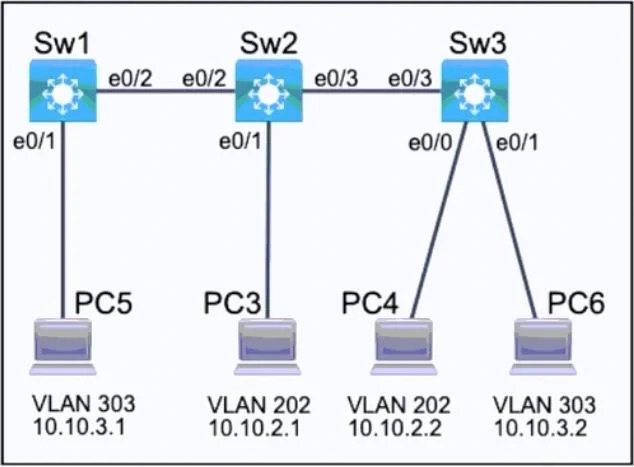
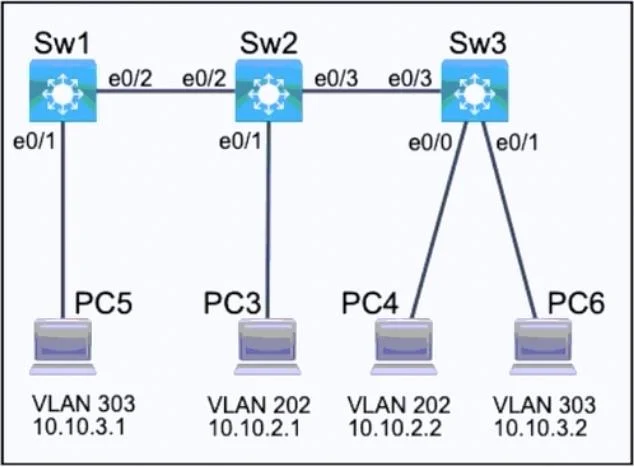
The lab builds Layer 2 network segmentation across three switches. Two VLANs isolate traffic by department (MARKETING=202, FINANCE=303). Only the VLANs that actually need to pass between switches are permitted on trunk links - this is the security requirement: no unnecessary VLAN traffic leaks across inter-switch links.
Traffic flow after configuration:
[FINANCE PC] --access e0/1--> SW1 --trunk e0/2--> SW2 --trunk e0/3--> SW3 --access e0/1--> [FINANCE PC]
[MARKETING PC] --access e0/1--> SW2 --trunk e0/3--> SW3 --access e0/0--> [MARKETING PC]
Switch-by-Switch Breakdown
SW1
SW1 only hosts a FINANCE PC. It connects upstream to SW2 via e0/2.
| Step | Command | Why |
|---|---|---|
enable | Enter privileged EXEC | Required before any config commands |
configure terminal | Enter global config mode | All VLAN/interface configs happen here |
vlan 303 / name FINANCE | Create VLAN 303 locally | VLANs must exist in the local VLAN database before you assign ports to them |
interface e0/1 -> switchport mode access | Set PC-facing port to access mode | Access ports carry exactly one VLAN untagged - correct for end devices |
switchport access vlan 303 | Assign the port to VLAN 303 | Associates this PC's traffic with FINANCE |
interface e0/2 -> switchport mode trunk | Set inter-switch link to trunk | Trunk ports carry tagged traffic for multiple VLANs |
switchport trunk allowed vlan 303 | Restrict trunk to VLAN 303 only | Security requirement - MARKETING traffic has no business on this link since SW1 has no MARKETING devices |
copy running-config startup-config | Save to NVRAM | Without this, a reload wipes all your work |
Note: The procedure also shows
vlan 202 / name MARKETINGon SW1. This is technically not required since SW1 has no MARKETING devices or links, but it's harmless and some graders may expect consistent VLAN databases. The critical part is thattrunk allowed vlan 303keeps MARKETING traffic off this link.
What breaks if skipped:
- Skip
vlan 303: The access port assignment fails silently or traffic is dropped - the VLAN doesn't exist to forward frames. - Skip
switchport trunk allowed vlan 303: The trunk defaults to allowing all VLANs, violating the security requirement. - Skip
copy run start: Reboot = full reconfiguration.
SW2
SW2 is the hub switch - it connects to both SW1 (e0/2) and SW3 (e0/3), and hosts a MARKETING PC on e0/1. It must carry both VLANs on its link to SW3.
| Step | Command | Why |
|---|---|---|
vlan 202 / name MARKETING | Create VLAN 202 | SW2 hosts a MARKETING PC and must forward that VLAN |
vlan 303 / name FINANCE | Create VLAN 303 | FINANCE traffic transits SW2 between SW1 and SW3 |
interface e0/1 -> access -> vlan 202 | MARKETING PC access port | Same logic as SW1 - end device gets untagged single-VLAN port |
interface e0/2 -> trunk -> allowed vlan 303 | Link to SW1 | SW1 only has FINANCE; no reason to send MARKETING frames toward SW1 |
interface e0/3 -> trunk -> allowed vlan 202,303 | Link to SW3 | SW3 has both MARKETING and FINANCE PCs, so both VLANs must traverse this link |
What breaks if skipped:
allowed vlan 303on e0/2 (instead of both): FINANCE traffic between SW1 and SW3 can't cross SW2 - hosts can't communicate.allowed vlan 202,303on e0/3 (if you only allowed one): The VLAN you excluded becomes unreachable on SW3.
SW3
SW3 hosts both a MARKETING PC (e0/0) and a FINANCE PC (e0/1), connecting upstream to SW2 via e0/3.
| Step | Command | Why |
|---|---|---|
vlan 202 / vlan 303 | Create both VLANs | Both are needed locally for the two PCs |
interface e0/0 -> access -> vlan 202 | MARKETING PC | Untagged access for end device |
interface e0/1 -> access -> vlan 303 | FINANCE PC | Untagged access for end device |
interface e0/3 -> trunk -> allowed vlan 202,303 | Link to SW2 | Both VLANs need to pass upstream to reach the rest of the network |
Typo alert in the provided answer: SW3's trunk command reads
allowed vlan 202,203- that should be202,303. VLAN 203 doesn't exist. Always double-check VLAN numbers; a single digit error means traffic is silently dropped.
Key Concepts to Remember
Access vs. Trunk:
- Access port = one VLAN, untagged. Use for PCs, printers, phones.
- Trunk port = multiple VLANs, 802.1Q tagged. Use for switch-to-switch links.
Trunk allowed VLAN logic - ask yourself:
"Which VLANs have devices on both sides of this link (directly or transitively)?"
- SW1<->SW2: Only FINANCE devices exist on/behind SW1 -> allow 303 only
- SW2<->SW3: Both MARKETING and FINANCE exist on SW3 -> allow 202,303
Memory tip - "Follow the traffic": Trace each PC's path to another PC of the same VLAN. Every trunk link that path crosses must have that VLAN permitted. If a VLAN doesn't need to cross a link, don't allow it - that's the security principle.
VTP note: The instruction says "do not modify VTP configurations." VTP can auto-propagate VLANs across switches, but the lab requires you to define them explicitly per switch. Don't touch vtp mode, vtp domain, or vtp password.
Quick Checklist Before Saving
- VLANs created with correct names on each switch?
- PC-facing ports set to
accessand assigned correct VLAN? - Inter-switch ports set to
trunkwith only the required VLANs in the allowed list? copy running-config startup-configrun on every switch?
Topics
Community Discussion
No community discussion yet for this question.