
200-301 · Question #665
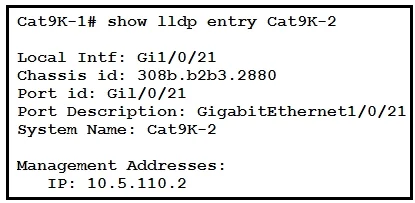
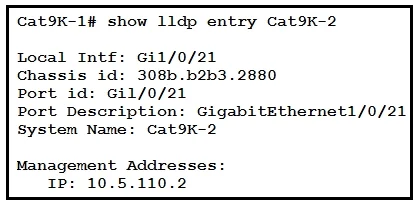
Refer to the exhibit. The network administrator must prevent the switch Cat9K-2 IP address from being visible in LLDP without disabling the protocol. Which action must be taken must be taken to…
The correct answer is A. Configure the no lldp tlv-select-management-address command globally on Cat9K-2. This example shows how to enable LLDP to send or receive IPv4 management address TLVs: switch# configure terminal switch(config)# lldp tlv-select management-address v4 sco_n3k_Layer_2_Switching_Config_602_u1_1/b_Cisco_n3k_Layer_2_Switching_Config_602_u 1_1_chapter_01001.pdf
Question
Refer to the exhibit. The network administrator must prevent the switch Cat9K-2 IP address from being visible in LLDP without disabling the protocol. Which action must be taken must be taken to complete the task?
Exhibits
Options
- AConfigure the no lldp tlv-select-management-address command globally on Cat9K-2
- BConfigure the no lldp transmit command on interface G1/0/21 in Cat9K-1
- CConfigure the no lldp receive command on interface G1/0/21 on Cat9K-1
- DConfigure the no lldp mac-phy-cfg command globally on Cat9K-2
How the community answered
(24 responses)- A79% (19)
- B13% (3)
- C4% (1)
- D4% (1)
Explanation
This example shows how to enable LLDP to send or receive IPv4 management address TLVs: switch# configure terminal switch(config)# lldp tlv-select management-address v4 sco_n3k_Layer_2_Switching_Config_602_u1_1/b_Cisco_n3k_Layer_2_Switching_Config_602_u 1_1_chapter_01001.pdf
Topics
Community Discussion
No community discussion yet for this question.