
200-301 · Question #554
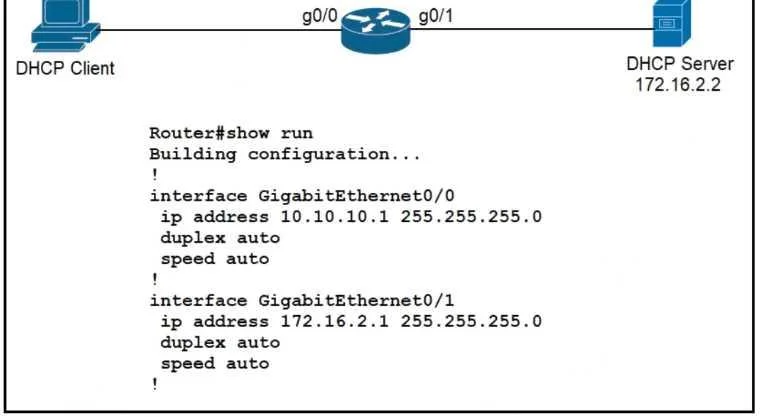
Refer to the exhibit. An engineer is configuring a new router on the network and applied this configuration. Which additional configuration allows the PC to obtain its IP address from a DHCP server?
The correct answer is C. Configure the ip helper-address 172.16.2.2 command under interface Gi0/0. To allow a PC on a different subnet to obtain an IP address from a DHCP server, the router must be configured as a DHCP relay agent.
Question
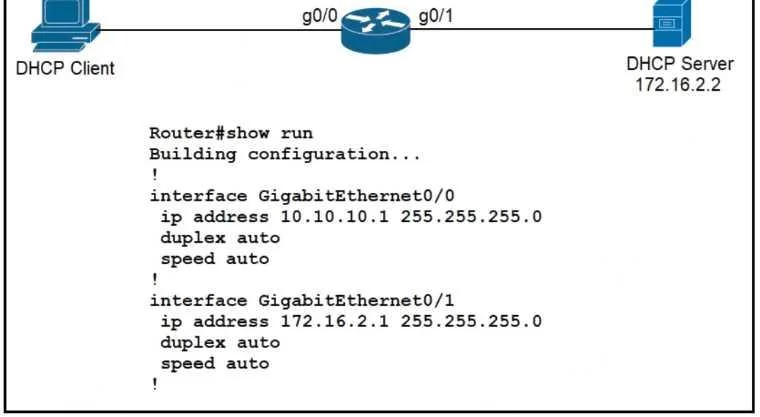
Refer to the exhibit. An engineer is configuring a new router on the network and applied this configuration. Which additional configuration allows the PC to obtain its IP address from a DHCP server?
Exhibits
Options
- AConfigure the ip dhcp relay information command under interface Gi0/1.
- BConfigure the ip dhcp smart-relay command globally on the router
- CConfigure the ip helper-address 172.16.2.2 command under interface Gi0/0
- DConfigure the ip address dhcp command under interface Gi0/0
How the community answered
(30 responses)- A3% (1)
- B17% (5)
- C73% (22)
- D7% (2)
Why each option
To allow a PC on a different subnet to obtain an IP address from a DHCP server, the router must be configured as a DHCP relay agent.
The `ip dhcp relay information` command adds Option 82 information to DHCP requests but does not enable the core relay functionality itself.
The `ip helper-address 172.16.2.2` command, applied to interface Gi0/0 (the router interface connected to the PC's subnet), configures the router to act as a DHCP relay agent. This causes the router to forward DHCP broadcast requests received on Gi0/0 as unicast packets to the DHCP server at `172.16.2.2`, enabling the PC to receive an IP address.
Concept tested: DHCP relay agent (ip helper-address)
Source: https://www.cisco.com/c/en/us/td/docs/ios-xml/ios/ipaddr_dhcp/configuration/15-s/dhcp-15-s-book/dhcp-relay.html
Topics
Community Discussion
No community discussion yet for this question.