nerdexam
Cisco

200-301 · Question #1782

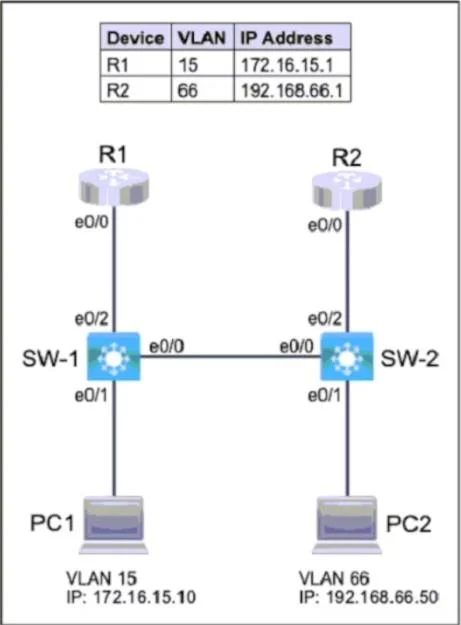
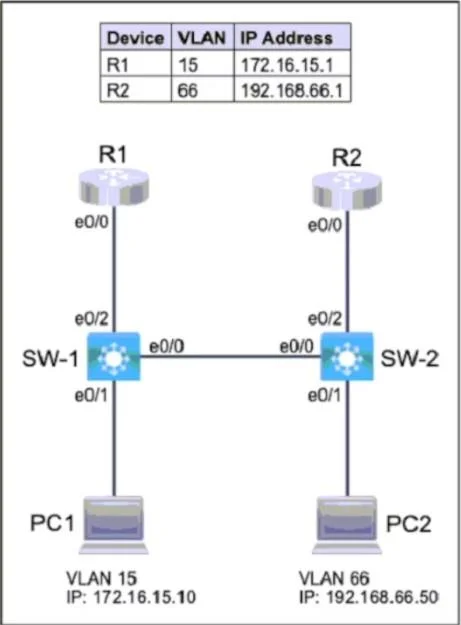
SIMULATION 72 Please use the "Tasks" and "Topology" tabs to complete this lablet. Topology Tasks Complete the tasks below: Task 1 - Configure SW-1 with VLAN 15 and label it exactly as OPS. - Configure

The correct answer follows the precise IOS command syntax required to accomplish all three tasks: creating VLANs with exact names using 'vlan <id>' and 'name <label>' in global config, configuring access ports with 'switchport mode access' and 'switchport access vlan <id>' (plus

Submitted by kim_seoul· Mar 5, 2026Network Access - Configure and verify VLANs, interswitch connectivity, and Layer 2 discovery protocols (LLDP/CDP) on Cisco IOS switches (CCNA 200-301 Domain 2)

Question

SIMULATION 72 Please use the "Tasks" and "Topology" tabs to complete this lablet. Topology Tasks Complete the tasks below: Task 1 - Configure SW-1 with VLAN 15 and label it exactly as OPS. - Configure SW-2 with VLAN 66 and label it exactly as ENGINEERING. Task 2 - Configure the switch port connecting to PC1. - Configure the switch port connecting to PC2. Task 3 - Configure SW-1 and SW-2 for neighbor discovery using LLDP. Answer: - SW-1 VLAN 15 named OPS: conf t vlan 15 name OPS It creates VLAN 15 and labels it exactly as OPS. - SW-2 VLAN 66 named ENGINEERING: conf t vlan 66 name ENGINEERING It creates VLAN 66 and labels it exactly as ENGINEERING. - SW-1 port to PC1 (e0/1) as access in VLAN 15: interface e0/1 switchport mode access switchport access vlan 15 spanning-tree portfast It places PC1 into VLAN 15 as an access port. - SW-2 port to PC2 (e0/1) as access in VLAN 66: interface e0/1 switchport mode access switchport access vlan 66 spanning-tree portfast It places PC2 into VLAN 66 as an access port. - Enable LLDP neighbor discovery on both switches: conf t lldp run It globally enables LLDP so SW-1 and SW-2 can discover each other.

Exhibits

200-301 question #1782 exhibit 1
200-301 question #1782 exhibit 2

Explanation

The correct answer follows the precise IOS command syntax required to accomplish all three tasks: creating VLANs with exact names using 'vlan <id>' and 'name <label>' in global config, configuring access ports with 'switchport mode access' and 'switchport access vlan <id>' (plus spanning-tree portfast for end-device ports), and enabling LLDP globally on both switches using 'lldp run' in global configuration mode. Each step must be executed in the correct configuration context (global config vs. interface config) and with exact naming to match the requirements, as Cisco IOS is case-sensitive for VLAN names and any deviation (e.g., 'ops' instead of 'OPS') would result in an incorrect configuration. LLDP must be explicitly enabled since it is disabled by default on Cisco IOS devices, unlike CDP which is enabled by default.

Topics

#VLAN Configuration#Switch Port Configuration#LLDP#Layer 2 Switching

Community Discussion

No community discussion yet for this question.

Full 200-301 Practice