nerdexam
Cisco

200-301 · Question #1758

Lab Simulation 65 Please use the "Tasks" and "Topology" tabs to complete this lablet. Topology Tasks Task 1 Complete the configuration of NAT/PAT on the R1 router using the predefined configuration. R

The correct answer systematically addresses all four tasks in sequence: Task 1 completes PAT by adding 'ip nat inside source list 192 interface e0/0 overload' which ties the ACL to the outside interface with overload (PAT); Task 2 configures R1 as NTP master with a Loopback0 sour

Submitted by asante_acc· Mar 5, 2026Infrastructure Services – Configure and verify NAT/PAT, NTP client/server relationships, DHCP relay agents (ip helper-address), and SSH access security on Cisco IOS routers and switches (Maps to CCNA 200-301 Domain: Network Services and Security Fundamentals)

Question

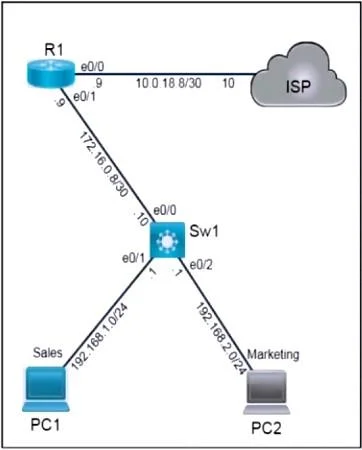
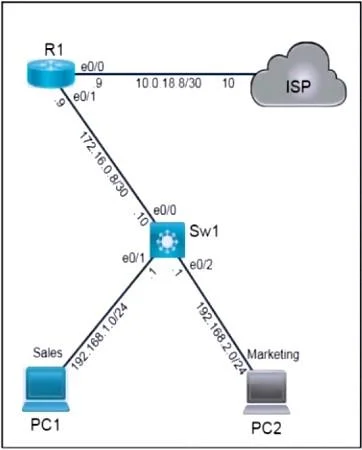
Lab Simulation 65 Please use the "Tasks" and "Topology" tabs to complete this lablet. Topology Tasks Task 1 Complete the configuration of NAT/PAT on the R1 router using the predefined configuration. R1 Predefined Configuration interface Ethernet0/0 ip nat outside interfaceEthernet0/1 ip nat inside access-list 192 permit ip 192.168.0.0 0.0.3.255 any Task Configure NTP on R1 and Sw1 using the following information: - NTP server = R1 - Source = Loopback 0 - Client = Sw1 Task 3 R1 is preconfigured with a DHCP pool and associated information. PC1 is configured to obtain an IP address automatically. - Configure a relay agent on Sw1. Task 4 Sw1 is preconfigured with a local user account and a domain name. Complete the SSH configuration on Sw1. - RSA Key = 2048 bits - SSH Version = 2 Answer: Task 1 - Complete NAT/PAT on R1 Predefined config already contains: ip nat inside ip nat outside access-list 192 permit ip 192.168.0.0 0.0.3.255 any Add the missing PAT rule: R1# conf t ip nat inside source list 192 interface e0/0 overload PAT requires mapping ACL 192 to the outside interface with overload. Task 2 - Configure NTP (R1 = server, Sw1 = client, source = Loopback0) R1 (NTP Server) R1# conf t interface Loopback0 ip address 10.1.1.1 255.255.255.255 ! example; use lab IP if different ntp master ntp source Loopback0 Sw1 (NTP Client) Sw1# conf t ntp server 10.1.1.1 ntp source vlan 1 ! or relevant SVI used for management NTP server sets its time source to Loopback0; Sw1 points to R1 as the server. Task 3 - Configure DHCP Relay on Sw1 R1 is the DHCP server. Sw1 must forward DHCP broadcasts. On Sw1, enable the helper on the VLAN interface used by PC1/PC2 (likely VLAN 1 unless otherwise specified): Sw1# conf t interface vlan 1 ip helper-address 172.16.0.9 ! R1 E0/1 IP from topology forwards DHCP requests toward R1. ip helper-address Task 4 - Complete SSH Configuration on Sw1 (RSA 2048, SSHv2) Sw1 already has username + domain name; generate key and enable SSH: Sw1# conf t crypto key generate rsa modulus 2048 ip ssh version 2 line vty 0 4 transport input ssh login local SSH requires an RSA key and SSH version 2. VTY lines must accept SSH and use local authentication.

Exhibits

200-301 question #1758 exhibit 1
200-301 question #1758 exhibit 2

Explanation

The correct answer systematically addresses all four tasks in sequence: Task 1 completes PAT by adding 'ip nat inside source list 192 interface e0/0 overload' which ties the ACL to the outside interface with overload (PAT); Task 2 configures R1 as NTP master with a Loopback0 source and Sw1 as the NTP client pointing to R1's loopback; Task 3 adds 'ip helper-address' on Sw1's SVI to relay DHCP broadcasts to R1's DHCP server; Task 4 generates a 2048-bit RSA key and sets SSH version 2 on Sw1, completing the SSH configuration that leverages the pre-existing local user account and domain name.

Topics

#NAT/PAT#NTP#DHCP Relay#SSH Configuration

Community Discussion

No community discussion yet for this question.

Full 200-301 Practice