
200-301 · Question #1665
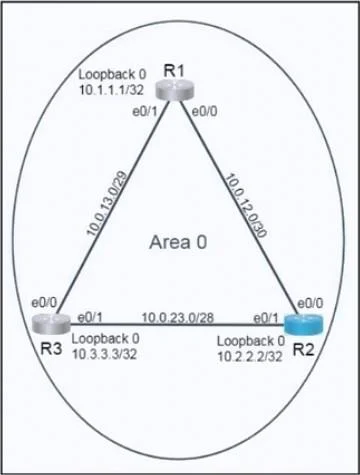
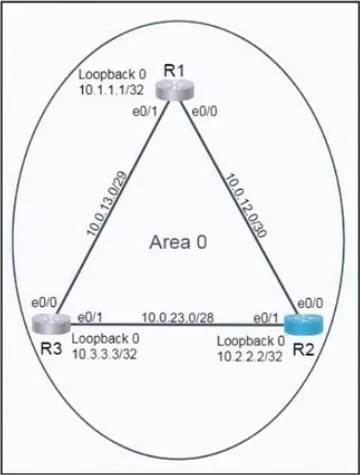
Lab Simulation 52 Please use the "Tasks" and "Topology" tabs to complete this lablet. Topology Tasks Refer to the topology. All physical cabling is in place. Routers 1 and 3 are accessible…
OSPF Lab Simulation 52 - Explanation Overall Goal Configure OSPF (Open Shortest Path First) on R2 so it forms neighbor relationships with R1 and R3, exchanges routing information in Area 0 (the backbone area), but never wins the DR/BDR election on any of its broadcast segments…
Question
Exhibits
Explanation
OSPF Lab Simulation 52 - Explanation
Overall Goal
Configure OSPF (Open Shortest Path First) on R2 so it forms neighbor relationships with R1 and R3, exchanges routing information in Area 0 (the backbone area), but never wins the DR/BDR election on any of its broadcast segments. This is a common design choice when a router is a transit/middle node and you want more capable routers (R1 and R3) to handle the DR/BDR roles.
Step-by-Step Breakdown
Step 1: router ospf 10
What it does: Enters OSPF router configuration mode and starts OSPF process 10.
Why necessary: OSPF process IDs are locally significant - they identify which OSPF instance you're configuring on this router. The process ID must match what the lab requires (10), though it doesn't need to match on neighboring routers.
If skipped: OSPF never starts. No neighbors form.
Step 2: router-id 10.2.2.2
What it does: Manually sets the OSPF Router ID to the loopback address 10.2.2.2 (Lo0's IP).
Why necessary: The Router ID is a 32-bit identifier that uniquely identifies this router in the OSPF domain. Using the loopback is best practice because loopbacks are always up - a physical interface going down won't cause an OSPF Router ID change and force a re-convergence. The lab explicitly requires this.
If skipped: OSPF auto-selects a Router ID (highest loopback or highest active interface IP), which may not match what the lab expects, causing verification to fail.
Note: If OSPF is already running, you must do
clear ip ospf processfor a newrouter-idto take effect.
Step 3: network 10.0.2.0 0.0.0.31 area 0
What it does: Enables OSPF on any interface whose IP falls within 10.0.2.0-10.0.2.31, and advertises that prefix into Area 0.
Why necessary: This matches R2's interface toward R1 (e0/0). The wildcard mask 0.0.0.31 corresponds to a /27 subnet (255.255.255.224). Using the exact prefix wildcard ensures only the precise network is advertised - not a supernet.
If skipped: R2's link to R1 won't run OSPF; R1 neighbor relationship won't form.
Step 4: network 10.0.23.0 0.0.0.15 area 0
What it does: Enables OSPF on R2's interface toward R3 (e0/1) and advertises the 10.0.23.0/28 prefix into Area 0.
Why necessary: The wildcard 0.0.0.15 = /28 (255.255.255.240). This activates OSPF on the R2<->R3 link.
If skipped: R3 neighbor relationship won't form.
Step 5: network 10.2.2.2 0.0.0.0 area 0
What it does: Advertises the loopback interface (Lo0, 10.2.2.2/32) into OSPF Area 0.
Why necessary: A wildcard of 0.0.0.0 means "match this exact IP address" - it's a host mask for a /32. This makes the loopback reachable from R1 and R3. Loopbacks are also used as router IDs and management addresses, so advertising them is standard practice.
If skipped: The loopback network won't appear in the OSPF topology; other routers can't reach R2's Lo0.
Step 6-9: Interface Priority to 0
interface e0/0
 ip ospf priority 0
interface e0/1
 ip ospf priority 0
What it does: Sets OSPF priority to 0 on both of R2's physical interfaces.
Why necessary: On broadcast/multi-access networks, OSPF elects a Designated Router (DR) and Backup Designated Router (BDR) to reduce flooding overhead. Priority values determine who wins:
- Highest priority -> DR
- Second highest -> BDR
- Priority 0 -> permanently ineligible - the router never participates in the election
This guarantees R2 will never become DR or BDR, leaving those roles to R1 and R3.
If skipped: R2 could win the DR/BDR election (especially if it has the highest Router ID), violating the lab requirement. R2 being DR also means if it goes down, the entire segment loses its flooding hub - undesirable for a transit router.
Why both interfaces? Each broadcast segment holds its own DR/BDR election. R2 has two such segments (toward R1 and toward R3), so both must be set to priority 0.
What Goes Wrong If Steps Are Out of Order
| Mistake | Consequence |
|---|---|
Set router-id after network statements | Router ID may auto-assign; need clear ip ospf process to fix |
Skip network for Lo0 | Loopback unreachable; also may cause Router ID mismatch |
| Skip priority 0 on one interface | R2 could still become DR/BDR on that segment |
Set priority 0 before router ospf | Command invalid - must be in interface config with OSPF already aware |
Memory Tip
"RINP-P" - Router OSPF, ID, Networks (3), Priority 0 per interface.
Or think of it as three phases:
- Start OSPF (process + router ID)
- Advertise networks (one
networkcommand per subnet, exact wildcard) - Disable DR eligibility (priority 0 on every broadcast interface)
The wildcard mask math: subtract the subnet mask from 255.255.255.255.
- /27 -> 255.255.255.224 -> wildcard = 0.0.0.31
- /28 -> 255.255.255.240 -> wildcard = 0.0.0.15
- /32 -> 255.255.255.255 -> wildcard = 0.0.0.0
Topics
Community Discussion
No community discussion yet for this question.