
200-301 · Question #1659
Lab Simulation 50 Guidelines This is a lab item in which tasks will be performed on virtual devices. - Refer to the Tasks tab to view the tasks for this lab item. - Refer to the Topology tab to…
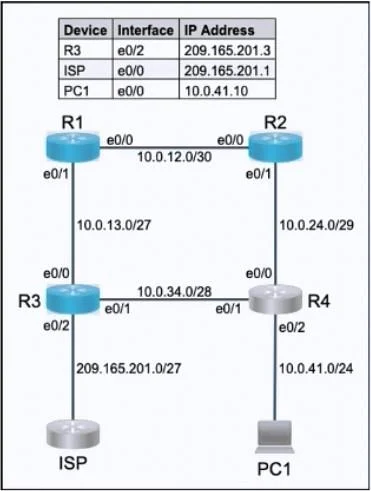
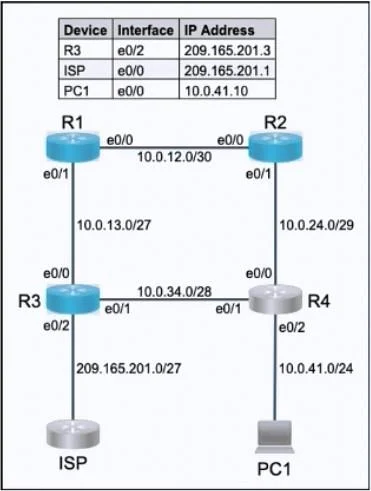
Lab Simulation 50 - Static Routing & Floating Routes Explanation Overall Goal The topology has R1 connected to two paths toward R4's LAN (where PC1 lives): one through R2 (primary) and one through R3 (backup). There is also an Internet-facing connection. The goal is to…
Question
Exhibits
Explanation
Lab Simulation 50 - Static Routing & Floating Routes Explanation
Overall Goal
The topology has R1 connected to two paths toward R4's LAN (where PC1 lives): one through R2 (primary) and one through R3 (backup). There is also an Internet-facing connection. The goal is to configure static routing to control path preference, provide failover, and enable Internet access - without a routing protocol.
Step 1: Primary Static Route (R1 -> R2 -> R4's LAN)
What it does: Installs a specific host or subnet route on R1 pointing to R4's LAN via R2's interface.
Why it's necessary: Without this, R1 has no knowledge of PC1's subnet. A static route with default administrative distance (AD = 1) via R2 makes R2 the preferred path.
Command pattern:
R1(config)# ip route <PC1-subnet> <mask> <R2-next-hop>
Key detail: "Reach only PC1 on R4's LAN" means you target the specific LAN subnet (not a default route), keeping the route specific so it doesn't catch unintended traffic.
Step 2: Floating Static Route (R1 -> R3 -> R4's LAN, backup)
What it does: Installs the same destination route via R3, but with a higher AD (e.g., AD = 5 or any value > 1).
Why it's necessary: If both routes had the same AD, the router would load-balance or pick arbitrarily. A higher AD makes this route floating - it only enters the routing table when the primary route (via R2) disappears (link down, next-hop unreachable).
Command pattern:
R1(config)# ip route <PC1-subnet> <mask> <R3-next-hop> 5
What goes wrong if skipped: During an R2 outage, R1 would have no route to PC1 - traffic blackholed.
Step 3: Default Routes on R1 and R3 to the Internet
What it does: Installs a 0.0.0.0 0.0.0.0 route pointing toward the Internet gateway using the fewest hops.
Why "least number of hops" matters: If R1 has a direct link to the Internet gateway, configure R1's default route to point there directly rather than routing through R3 first. Same logic applies to R3 - use its own directly connected path if available, not a multi-hop path.
Command pattern:
R1(config)# ip route 0.0.0.0 0.0.0.0 <internet-gateway-next-hop>
R3(config)# ip route 0.0.0.0 0.0.0.0 <internet-gateway-next-hop>
What goes wrong if skipped: R1 and R3 can't reach the Internet - any traffic to unknown destinations is dropped.
What Goes Wrong If Steps Are Out of Order or Skipped
| Skipped Step | Consequence |
|---|---|
| Step 1 | No primary path to PC1; traffic may go via R3 (wrong preference) or fail entirely |
| Step 2 | No failover; R2 outage = PC1 unreachable |
| Step 3 | Internet unreachable from R1/R3 |
Memory Tip
Think "Specific -> Floating -> Default":
- Specific route first (precise destination, preferred path, AD=1)
- Floating backup second (same destination, higher AD, alternate path)
- Default route last (catch-all for Internet, minimize hops)
This mirrors the order of route specificity: most specific routes win, defaults catch everything else.
Don't Forget
Always write memory (or copy run start) before moving on - the lab explicitly requires saving to NVRAM.
Topics
Community Discussion
No community discussion yet for this question.