
200-301 · Question #1596
Lab Simulation 40 Guidelines This is a lab item in which tasks will be performed on virtual devices. - Refer to the Tasks tab to view the tasks for this lab item. - Refer to the Topology tab to…
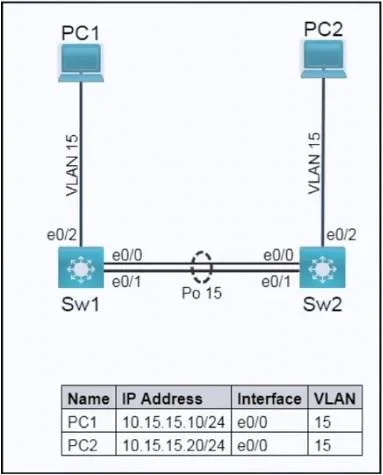
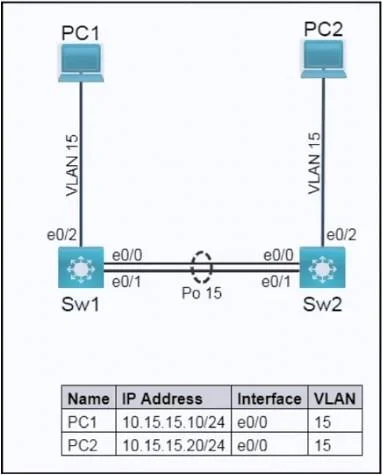
The correct approach involves configuring LACP-based link aggregation on interfaces E0/0-1 on both switches, then applying 802.1Q trunking with a specified native VLAN (45) and allowed VLANs (15, 45) to the resulting Port-channel 15 interface, and finally verifying connectivity.
Question
Exhibits
Explanation
The correct approach involves configuring LACP-based link aggregation on interfaces E0/0-1 on both switches, then applying 802.1Q trunking with a specified native VLAN (45) and allowed VLANs (15, 45) to the resulting Port-channel 15 interface, and finally verifying connectivity.
Approach. The lab requires two main tasks: configuring 802.1Q trunks and 802.3ad (LACP) link aggregation. It is best practice to configure the EtherChannel (link aggregation) first, then apply Layer 2 configurations like trunking to the logical EtherChannel interface.
For both Sw1 and Sw2, the following CLI commands should be entered:
-
Enter privileged EXEC mode and then global configuration mode:
enable configure terminal -
Task 2: Configure IEEE 802.3ad link aggregation (LACP) on interfaces E0/0 and E0/1:
interface range ethernet 0/0 - 1
  channel-group 15 mode active
  no shutdown
exit
interface range ethernet 0/0 - 1: Selects the physical interfaces to be bundled.channel-group 15 mode active: Creates Port-channel 15 and enables LACP (IEEE 802.3ad) in active mode. 'Active' mode ensures that both links actively try to negotiate the aggregation, satisfying 'Both links must negotiate aggregation' and 'Assign number 15 to the link'.
-
Task 1: Configure trunking on the Port-channel 15 interface:
interface port-channel 15
  switchport mode trunk
  switchport trunk native vlan 45
  switchport trunk allowed vlan 15,45
  no shutdown
exit
interface port-channel 15: Switches configuration context to the newly created logical interface.switchport mode trunk: Configures the interface as a trunk port, using the IEEE 802.1Q standard frame tagging method (default for Cisco when specifying trunk mode).switchport trunk native vlan 45: Sets VLAN 45 as the untagged (native) VLAN on the trunk, as required by 'Add VLAN 45 as untagged on the trunk ports'.switchport trunk allowed vlan 15,45: Restricts the trunk to permit only VLAN 15 and VLAN 45 (the native VLAN), fulfilling 'Only extend VLAN 15 and the untagged VLAN across the trunk'.
-
Save the configuration:
end
copy running-config startup-config
copy running-config startup-config: Saves the current running configuration to NVRAM, as required by the lab guidelines.
-
Task 1 Verification: Verify that PC1 is capable of pinging PC2.
- From PC1's console, execute
ping 10.15.15.20. - From PC2's console, execute
ping 10.15.15.10. - A successful ping confirms that the link aggregation, trunking, and VLAN configurations are correct and operational.
- From PC1's console, execute
Common mistakes.
- common_mistake. Common mistakes include:
- Using
channel-group 15 mode oninstead ofmode active: 'Mode on' creates a static EtherChannel (Port-channel) without LACP negotiation, failing the requirement for 'IEEE 802.3ad' and 'Both links must negotiate aggregation'. - Using
channel-group 15 mode passiveon both switches: If both sides are in passive LACP mode, they will only listen for LACP packets and will not initiate negotiation, thus an EtherChannel will not form. At least one side must be 'active'. - Configuring
switchport mode trunkand other trunk settings on the physical interfaces (e0/0-1) before creating thechannel-group: While some Cisco IOS versions might allow this through configuration inheritance, the most reliable and standard approach is to first bundle the interfaces into a Port-channel, and then apply all Layer 2 (or Layer 3) configurations directly to the logicalinterface port-channelinterface. Configuring physical interfaces first can lead to configuration loss or inconsistency when they are bundled. - Incorrect native VLAN: Not setting
switchport trunk native vlan 45would leave the native VLAN as the default (usually VLAN 1), failing a specific task requirement. - Incorrect allowed VLANs: Allowing all VLANs (
switchport trunk allowed vlan all) or not restricting them to15,45would work for VLAN 15 but violates the explicit instruction to 'Only extend VLAN 15 and the untagged VLAN across the trunk'. - Not performing symmetrical configuration on both Sw1 and Sw2: Link aggregation and trunking are point-to-point protocols and require identical (or compatible) configurations on both ends to function correctly.
- Not saving the configuration: Failing to execute
copy running-config startup-configwill cause all applied configurations to be lost if the device reloads or the lab simulation moves to the next question, resulting in task failure.
Concept tested. The question tests fundamental networking concepts including: VLAN trunking (IEEE 802.1Q), Native VLAN configuration, Allowed VLANs on a trunk, Link Aggregation Control Protocol (LACP) using IEEE 802.3ad, EtherChannel/Port-channel creation and configuration, and basic network connectivity verification (ping).
Topics
Community Discussion
No community discussion yet for this question.