nerdexam
Cisco

200-301 · Question #1523

Lab Simulation 24 Guidelines This is a lab item in which tasks will be performed on virtual devices. - Refer to the Tasks tab to view the tasks for this lab item. - Refer to the Topology lab to access

The correct configuration requires setting SW-1's F0/1 as an access port with a data VLAN and a separate voice VLAN to simultaneously support a PC and a Cisco IP phone on the same physical port - this is achieved using 'switchport mode access', 'switchport access vlan [data-vlan]

Submitted by carter_n· Mar 5, 2026Network Access – Configure and verify VLANs (normal range) spanning multiple switches, interswitch connectivity (trunk ports), and support for IP phones using voice VLANs; manage Layer 2 discovery protocols (LLDP/CDP) per Cisco CCNA Exam Topic 2.0

Question

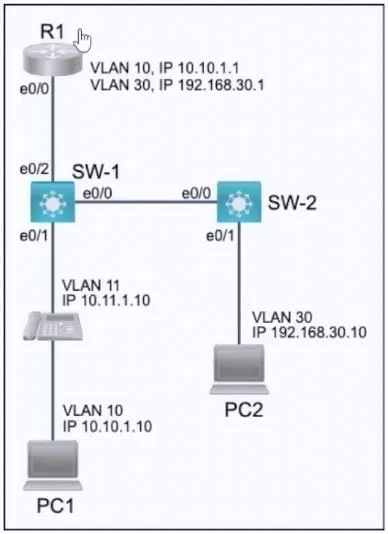
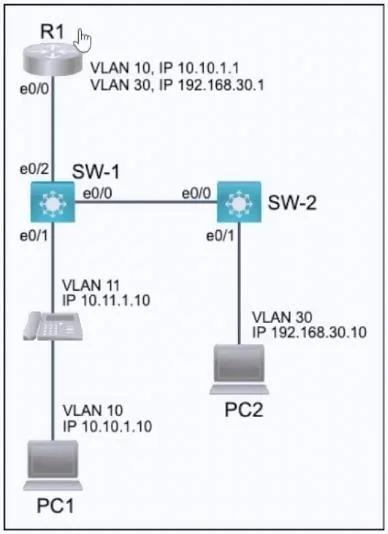
Lab Simulation 24 Guidelines This is a lab item in which tasks will be performed on virtual devices. - Refer to the Tasks tab to view the tasks for this lab item. - Refer to the Topology lab to access the device console(s) and perform the tasks. - Console access is available for all required devices by clicking the device icon or using the tab(s) above the console window. - All necessary preconfigurations have been applied. - Do not change the enable password or hostname for any device. - Save your configurations to NVRAM before moving to the next item. - Click Next at the bottom of the screen to submit this lab and move to the next question. - When Next is clicked, the lab closes and cannot be reopened. Topology Tasks R1 has been pre-configured with all the necessary commands. All physical cabling is in place and verified. Connectivity to the end devices must be configured. 1. Configure SW-1 switch port 0/1 to carry traffic for the Cisco IP phone and PC 2. Configure SW-2 E0/1 to carry traffic for PC2 3. Configure VLAN 10 with the name "Engineering" on SW-1 4. Configure the link between SW-1 and SW-2 to use the vendor neutral neighbor discovery protocol 5. Configure the link on SW-1 to R1 so that it does not allow the Cisco neighbor discovery protocol to pass Answer: SW-1: SW-1>en SW-1# Config t SW-1(config)# vlan 10 SW-1(config-vlan)# name Engineering SW-1(config-vlan)#int f0/10 SW-1(config-if)#lldp transmit SW-1(config-if)#lldp receive SW-1(config-if)#int f0/1 SW-1(config-if)#switchport mode access SW-1(config-if)#switchport access vlan 10 SW-1(config-if)#switchport voice vlan 11 SW-1(config-if)#int f0/2 SW-1(config-if)#no cdp enable SW-1(config-if)#end SW-1#wr SW-2: SW-2>en SW-2# Config t SW-2(config)#int f0/10 SW-2(config-if)#lldp transmit SW-2(config-if)#lldp receive SW-2(config-if)#int f0/1 SW-2(config-if)#switchport mode access SW-2(config-if)#switchport access vlan 30 SW-2(config-if)#end SW-2#wr

Exhibits

200-301 question #1523 exhibit 1
200-301 question #1523 exhibit 2

Explanation

The correct configuration requires setting SW-1's F0/1 as an access port with a data VLAN and a separate voice VLAN to simultaneously support a PC and a Cisco IP phone on the same physical port - this is achieved using 'switchport mode access', 'switchport access vlan [data-vlan]', and 'switchport voice vlan [voice-vlan]'. SW-2's E0/1 must be configured as a trunk to carry multiple VLANs between switches. LLDP must be enabled on the appropriate inter-switch and router-facing interfaces to satisfy neighbor discovery requirements, and VLAN 10 named 'Engineering' must be created on SW-1 before being assigned to ports.

Topics

#Voice VLAN Configuration#VLAN Trunking#LLDP/CDP Neighbor Discovery#Layer 2 Switching

Community Discussion

No community discussion yet for this question.

Full 200-301 Practice