
200-301 · Question #1459
Lab Simulation 19 Guidelines This is a lab item in which tasks will be performed on virtual devices. - Refer to the Tasks tab to view the tasks for this lab item. - Refer to the Topology tab to…
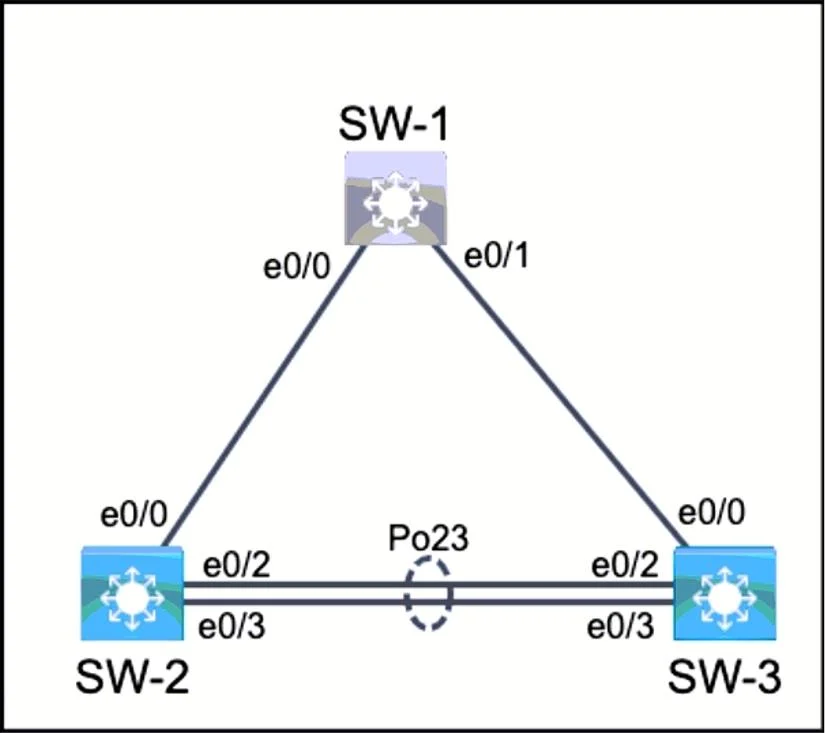
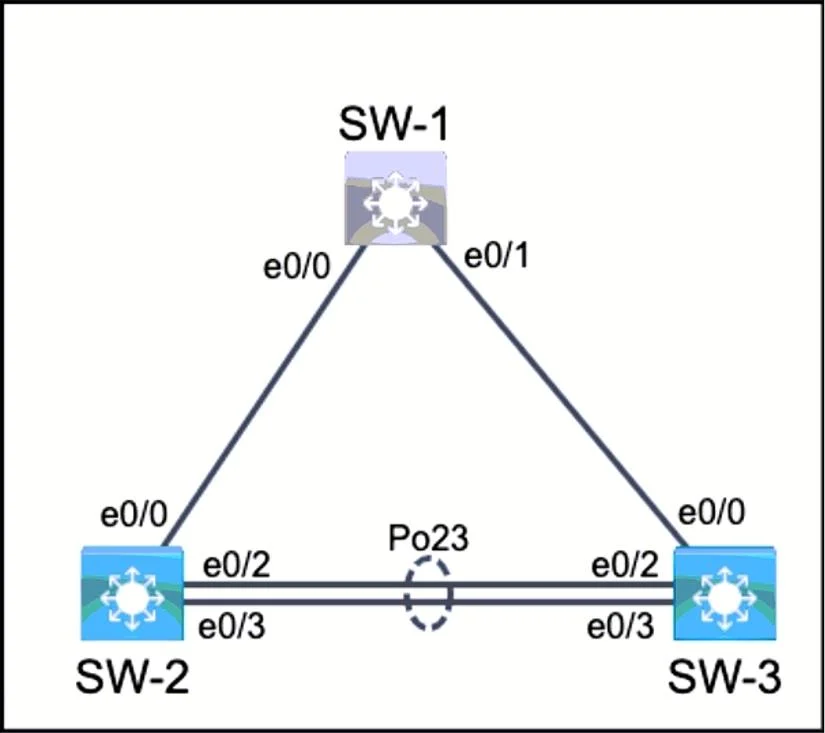
Lab Simulation 19: Trunk Configuration & EtherChannel (LACP) --- Overall Goal You are configuring two inter-switch links between SW-2 and SW-3: 1. E0/0 - A trunk port with selective VLAN behavior: only VLAN 10 traffic is tagged; VLAN 11 is the native (untagged) VLAN. 2. E0/2 +…
Question
Exhibits
Explanation
Lab Simulation 19: Trunk Configuration & EtherChannel (LACP)
Overall Goal
You are configuring two inter-switch links between SW-2 and SW-3:
- E0/0 - A trunk port with selective VLAN behavior: only VLAN 10 traffic is tagged; VLAN 11 is the native (untagged) VLAN.
- E0/2 + E0/3 - A redundant, load-balanced logical link (EtherChannel / Port-Channel) using the industry-standard link aggregation protocol (LACP/802.3ad), carrying all VLANs.
The key protocols and standards involved:
| Standard | Purpose | Alternative (Cisco proprietary) |
|---|---|---|
| 802.1Q (dot1q) | VLAN trunking encapsulation | ISL |
| LACP (802.3ad) | Link aggregation negotiation | PAgP |
Task 1 & 2 - Port E0/0: Selective Trunk (Steps 1–6 / 18–23)
Step-by-step
config t
Enters global configuration mode. Required before any interface-level changes.
interface e0/0
Enters the specific interface context. All subsequent commands apply only to this port.
switchport trunk encapsulation dot1q
Sets the trunking encapsulation to IEEE 802.1Q - the "industry standard" the task requires. The alternative is Cisco's proprietary ISL (Inter-Switch Link), which is older and no longer common.
Order note: On platforms that support both ISL and dot1q (like IOS on older Catalyst switches), you must set encapsulation before or at the same time as setting the mode to trunk. On some platforms,
switchport mode trunkwill error if encapsulation is ambiguous. The procedure lists mode before encapsulation - this works on many platforms, but best practice is encapsulation first.
switchport mode trunk
Unconditionally sets the port to trunk mode. Without this, the port could remain in access mode or attempt dynamic negotiation (DTP), which is unreliable and a security risk.
switchport trunk allowed vlan 10 (Corrected from answer)
Important: The provided answer uses
switchport access vlan 10, which is an access port command and has no effect on a trunk port. The correct command to fulfill "only tag VLAN 10" isswitchport trunk allowed vlan 10.
This restricts the trunk to only carry VLAN 10 as a tagged frame. Without this, the trunk would carry all VLANs by default. The native VLAN (set next) is carried untagged and does not need to appear in the allowed list separately on most platforms.
switchport trunk native vlan 11
Sets VLAN 11 as the native VLAN - the VLAN whose traffic crosses the trunk without an 802.1Q tag. This fulfills Task 2: "send and receive untagged traffic over VLAN 11."
What goes wrong if skipped: The native VLAN defaults to VLAN 1. Untagged traffic would land in the wrong VLAN, and if the two sides of a trunk have mismatched native VLANs, CDP/STP will warn about a native VLAN mismatch, and traffic will be misrouted.
Task 3 & 4 - Ports E0/2 & E0/3: EtherChannel with LACP (Steps 7–17 / 24–34)
Why EtherChannel?
Spanning Tree Protocol (STP) blocks redundant physical links to prevent loops. EtherChannel bundles physical links into one logical Port-Channel interface, so STP sees one link rather than two - giving you redundancy and bandwidth aggregation without blocked ports.
interface e0/2 / interface e0/3
Configure each physical member port individually. Both must be configured identically (same VLAN, same speed/duplex, same channel-group) or the EtherChannel will fail to form.
switchport trunk encapsulation dot1q
Same reason as before - 802.1Q is required. Applies to both physical ports.
switchport mode trunk
Sets each physical port to trunk mode so it carries all VLANs. Task 3 says "tag all VLANs," meaning no allowed vlan restriction - the default behavior (all VLANs allowed) is correct here.
channel-group 23 mode passive (SW-2) / channel-group 23 mode active (SW-3)
This is the LACP assignment. Breaking it down:
| Component | Meaning |
|---|---|
channel-group 23 | Assigns this port to logical Port-Channel 23 |
mode passive | Listens for LACP PDUs but does not initiate - fulfills "SW-2 must not initiate" |
mode active | Sends LACP PDUs immediately - fulfills "SW-3 must immediately negotiate" |
Why number 23? The "designated number assignment" convention here uses the two switch numbers (SW-2 and SW-3) concatenated → 23. This makes the channel-group number self-documenting.
Critical rule: A LACP channel requires at least one side to be
active.passive↔passivewill never form a channel because neither side initiates.active↔passiveoractive↔activeboth work. If you set both sides to passive, the EtherChannel silently never forms.
What goes wrong if skipped: Without
channel-group, the ports operate as independent trunks. STP would block one of them, eliminating redundancy. You'd also lose the bandwidth aggregation benefit.
interface port-channel 23
switchport mode trunk
switchport trunk encapsulation dot1q
The Port-Channel interface is the logical interface that STP, routing, and VLANs actually use. Even though physical ports have their settings, you must explicitly configure the logical Port-Channel with matching trunk settings. Some IOS versions inherit settings automatically, but explicitly setting them ensures correctness and survives reboots.
What goes wrong if skipped: The Port-Channel interface may come up in default access mode (VLAN 1), dropping all tagged traffic even if the physical ports are correctly configured. Inter-VLAN traffic would fail.
What Would Break if Steps Were Done Out of Order
| Mistake | Consequence |
|---|---|
Setting mode trunk before encapsulation dot1q on dual-encap platforms | Command rejected; port stays in default mode |
Setting native vlan without mode trunk | Command may succeed but has no effect; native VLAN mismatch when trunk activates |
Setting channel-group before switchport mode trunk | Physical ports may negotiate EtherChannel but Port-Channel interface defaults to access mode |
Both sides of LACP set to passive | Channel never forms; STP blocks one link |
Skipping interface port-channel 23 configuration | Logical interface comes up in wrong mode; tagged VLANs fail to pass |
Memory Tips
dot1q vs ISL: "Dot1q is the Default industry standard" - anything with "industry standard" on an exam = 802.1Q = encapsulation dot1q.
Native VLAN = untagged VLAN: Think of "native" as the port's home VLAN - it doesn't need a tag because it's already home.
LACP modes - Active vs Passive: Think of LACP like a phone call. Active dials first. Passive only picks up. Someone has to dial - so you need at least one active side.
Channel-group number: Use the two switch endpoint numbers concatenated (SW-2 ↔ SW-3 → group 23). Works up to 9+9 = consistent naming.
LACP vs PAgP: "LACP = Legit standard (IEEE 802.3ad)"; PAgP = Proprietary (PAgP = Proprietary Aggregation Protocol).
Topics
Community Discussion
No community discussion yet for this question.