nerdexam
CiscoCisco

200-301 · Question #1442

200-301 Question #1442: Real Exam Question with Answer & Explanation

Sign in or unlock 200-301 to reveal the answer and full explanation for question #1442. The question stem and answer options stay visible for context.

Submitted by marco_it· Mar 5, 2026Network Access – Configure and verify VLANs (normal range) spanning multiple switches, configure and verify interswitch connectivity, and configure Layer 2 discovery protocols (LLDP) as tested in CCNA 200-301 Domain 2: Network Access.

Question

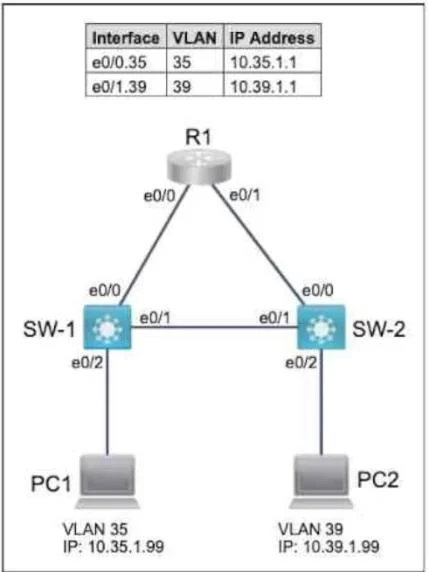
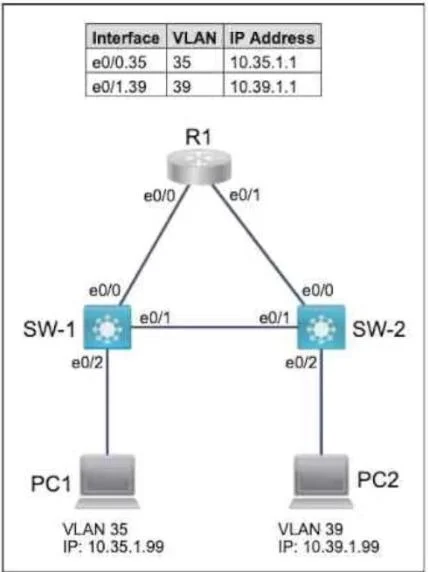
Lab Simulation 17 Guidelines This is a lab item in which tasks will be performed on virtual devices. - Refer to the Tasks tab to view the tasks for this lab item. - Refer to the Topology tab to access the device console(s) and perform the tasks. - Console access is available for all required devices by clicking the device icon or using the tab(s) above the console window. - All necessary preconfigurations have been applied. - Do not change the enable password or hostname for any device. - Save your configurations to NVRAM before moving to the next item. - Click Next at the bottom of the screen to submit this lab and move to the next question. - When Next is clicked, the lab doses and cannot be reopened. Topology Tasks R1 has been pre-configured with all the necessary commands. All physical cabling is in place and verified. Connectivity for PC1 and PC2 must be established to the switches, and each port must only allow one VLAN. 1. Configure SW-1 with VLAN 35 and label it exactly as SALES 2. Configure SW-2 with VLAN 39 and label it exactly as MARKETING 3. Configure the switch port connecting to PC1 4. Configure the switch port connecting to PC2 5. Configure SW-1 and SW-2 for universal neighbor discovery using the industry standard protocol and disable it on the interface connecting to PC1 Answer: Task 1. Configure SW-1 with VLAN 15 and label it exactly as OPS SW-1(config)#vlan 35 SW-1(config-vlan)#name SALES SW-1(config-vlan)#exit //To apply the VLAN configured Task 2. Configure SW-2 with VLAN 66 and label it exactly as ENGINEERING SW-2(config)#vlan 39 SW-2(config-vlan)#name MARKETING SW-2(config-vlan)#exit //To apply the VLAN configured Task 3. Configure the switch port connecting to PC1 SW-1(config)#int e0/2 SW-1(config-if)#switchport mode access SW-1(config-if)#switchport access vlan 35 SW-1(config-if)#no shut Task 4. Configure the switch port connecting to PC2 SW-2(config)#int e0/2 SW-2(config-if)#switchport mode access SW-2(config-if)#switchport access vlan 39 SW-2(config-if)#no shut Task 5. Configure SW-1 and SW-2 for universal neighbor discovery using the industry standard protocol and disable it on the interface connecting to PC1 "neighbor discovery using the vendor-neutral standard protocol" means LLDP while "Cisco proprietary protocol" means CDP. On both SW-1 and SW-2 SW-1(config)#lldp run SW-2(config)#lldp run On SW-1 SW-1(config)#int e0/2 SW-1(config-if) no lldp transmit SW-1(config-if) no lldp recieve

Options

  • taskConfigure network devices SW-1 and SW-2 with specific VLANs (35 for SALES, 39 for MARKETING), establish connectivity for PC1 and PC2 on these VLANs, and implement LLDP neighbor discovery, ensuring it is disabled on the interface connected to PC1.
  • prerequisitesAccess to virtual device consoles for SW-1 and SW-2. R1 is pre-configured. Physical cabling is verified. All necessary preconfigurations have been applied. Do not change the enable password or hostname for any device.

Unlock 200-301 to see the answer

You've previewed enough free 200-301 questions. Unlock 200-301 for full answers, explanations, the timed quiz mode, progress tracking, and the master PDF. Question stem and options stay visible so you can still see what's on the exam.

Topics

#VLAN Configuration#Access Port Assignment#LLDP#Layer 2 Switching
Full 200-301 PracticeBrowse All 200-301 Questions