
200-301 · Question #1391
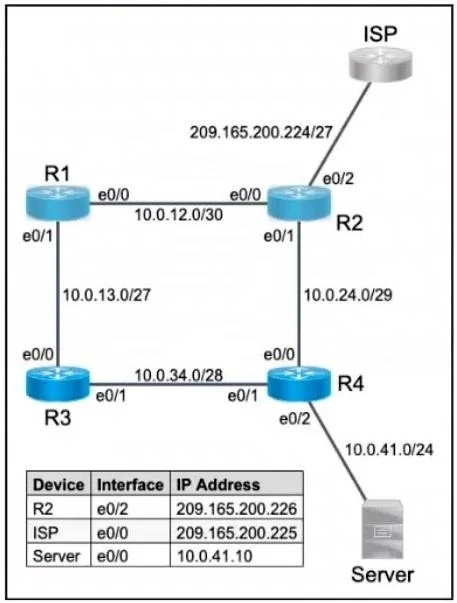
Lab Simulation 15 Guidelines This is a lab item in which tasks will be performed on virtual devices - Refer to the Tasks tab to view the tasks for this lab item. - Refer to the Topology tab to…
This lab tests the ability to configure IPv4 static routes on Cisco routers, including default routes (gateway of last resort) and specific host/network routes with path preference using administrative distance.
Question
Exhibits
Explanation
This lab tests the ability to configure IPv4 static routes on Cisco routers, including default routes (gateway of last resort) and specific host/network routes with path preference using administrative distance.
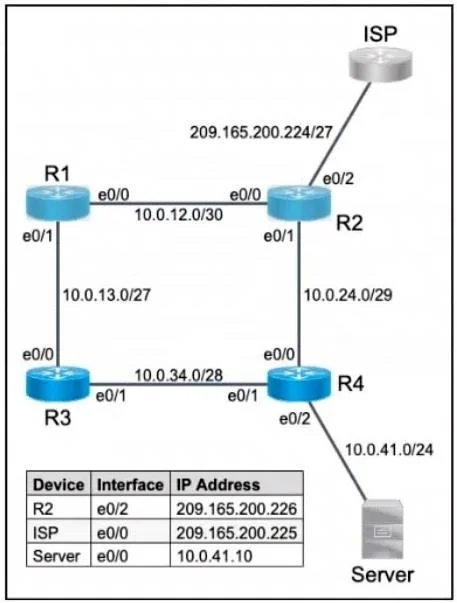
Approach. Each task requires a specific static route command on Cisco IOS. Task 1 & 2 use a default route (ip route 0.0.0.0 0.0.0.0 <ISP-facing-next-hop>) on R2 and R1 respectively - this catches all traffic with no more-specific match and forwards it toward the ISP. Task 3 on R2 requires a host route to 10.0.41.10 (ip route 10.0.41.10 255.255.255.255 <next-hop>), targeting only that server. Task 4 on R1 requires a static route to the LAN subnet via R3 as the primary next-hop; to also have a backup path (floating static route), a second route to the same LAN is added via a different next-hop with a higher administrative distance (e.g., AD=2 vs default AD=1), so R3 is preferred unless it fails. All configurations must be saved with copy running-config startup-config (or wr) before clicking Next.
Concept tested. IPv4 static routing on Cisco IOS - including default routes (0.0.0.0/0), host-specific routes (/32), and floating static routes (manipulating administrative distance to establish primary vs. backup path preference).
Reference. Cisco IOS IP Routing Configuration Guide - Static Routes; CompTIA Network+ / CCNA routing fundamentals: administrative distance and static route configuration.
Topics
Community Discussion
No community discussion yet for this question.