
200-301 · Question #1356
Lab Simulation 13 Guidelines This is a lab item in which tasks will be performed on virtual devices - Refer to the Tasks tab to view the tasks for this lab item. - Refer to the Topology tab to…
This lab simulation requires configuring static routes on routers R1 and R2, including host-specific, network-specific, default, and administrative-distance-based failover routes, based on a provided network topology and specific connectivity requirements.
Question
Exhibits
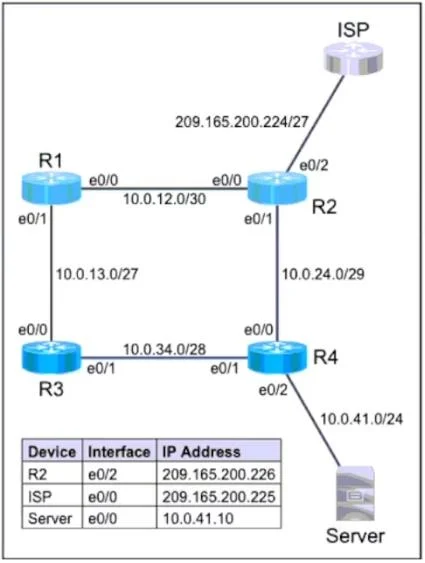
Explanation
This lab simulation requires configuring static routes on routers R1 and R2, including host-specific, network-specific, default, and administrative-distance-based failover routes, based on a provided network topology and specific connectivity requirements.
Approach. The correct interaction is to access the console for R1 and R2 in the simulation and enter the provided 'ip route' commands exactly as shown. Each command directly addresses one of the specified routing tasks:
-
Task 1: Configure a route on R1 to ensure that R1 prefers R2 when traffic is destined to the server only.
- Command:
Ip route 10.0.41.10 255.255.255.255 10.0.12.2 - Reasoning: This is a host route (255.255.255.255 mask) specifically for the server's IP address (10.0.41.10). The next hop, 10.0.12.2, is the IP address of R2's interface e0/0, which connects to R1, ensuring traffic for the server goes via R2.
- Command:
-
Task 2: Configure a default route on R2 to the ISP.
- Command:
Ip route 0.0.0.0 0.0.0.0 209.165.200.225 - Reasoning: The
0.0.0.0 0.0.0.0destination and mask define a default route, which matches all unknown destinations. The next hop, 209.165.200.225, is the IP address of the ISP's e0/0 interface, ensuring all traffic from R2 not explicitly routed goes to the ISP.
- Command:
-
Task 4 (processed before Task 3 for clarity): Configure a route on R1 to ensure that R1 prefers R3 when traffic is destined to the R4 LAN at 10.0.41.0/24.
- Command:
Ip route 10.0.41.0 255.255.255.0 10.0.13.2 - Reasoning: This creates a static route for the entire R4 LAN (10.0.41.0/24). The next hop, 10.0.13.2, is R3's interface e0/0, making R3 the preferred path for the R4 LAN due to the default administrative distance of 1 for static routes.
- Command:
-
Task 3: Configure a route on R1 to ensure that R1 will use R2 for the R4 LAN if the link fails between R3 and R4.
- Command:
Ip route 10.0.41.0 255.255.255.0 10.0.12.2 200 - Reasoning: This is a floating static route for the R4 LAN (10.0.41.0/24) via R2 (next hop 10.0.12.2). By assigning an administrative distance (AD) of 200, this route becomes less preferred than the primary route via R3 (which has a default AD of 1). If the primary route via R3 becomes unavailable (e.g., due to a link failure), this backup route via R2 will automatically become active, providing failover.
- Command:
Common mistakes.
- common_mistake. Common mistakes include:
- Incorrect next-hop IP addresses: Specifying the wrong IP address for the adjacent router interface (e.g., using R1's own IP on the link instead of R2's or R3's IP).
- Incorrect subnet masks: Using a host mask (/32 or 255.255.255.255) for a network route or a network mask (/24 or 255.255.255.0) for a host route.
- Missing or incorrect administrative distance (AD): Not using an AD for the backup route, or using an AD that is equal to or lower than the primary route, which would prevent proper failover or cause route flapping/load balancing when only failover is intended.
- Confusing destination IP vs. network: Applying a route for a specific host (10.0.41.10) when a route for the entire network (10.0.41.0/24) is required, or vice versa.
- Attempting to configure inaccessible devices: The prompt clearly states R3 and R4 are fully configured and inaccessible; attempts to configure them would be incorrect.
Concept tested. The core concepts tested are:
- Static routing configuration on Cisco IOS devices.
- Understanding and implementing different types of static routes: network routes, host routes, and default routes.
- Using administrative distance (AD) to control route preference and implement floating static routes for failover/backup paths.
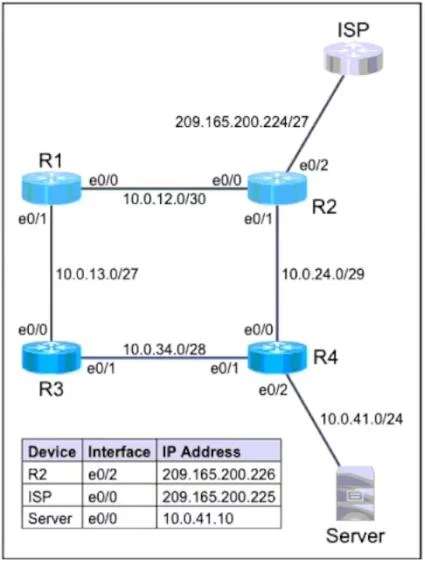
- Interpreting network topology diagrams and IP addressing schemes to determine appropriate next-hop addresses.
- Troubleshooting potential routing issues based on requirements.
Topics
Community Discussion
No community discussion yet for this question.